DNSSEC HOWTO
DNSSEC HOWTO, a tutorial in disguise
Download the most recent version of the PDF version here: http://www.nlnetlabs.nl/dnssec_howto/dnssec_howto.pdf
Contents
1 Configuring a recursive name server to validate answers
1.1 Introduction
1.2 Warning
1.3 Configuring the caching forwarder
1.3.1 Configuring a trust anchor
1.3.2 Testing
1.4 Finding trust-anchors
1.5 Lookaside Validation
1.5.1 Configuring lookaside validation
1.5.1.1 testing
1.6 Some Troubleshooting Tips
2 Securing a DNS zone
2.1 Introduction
2.2 Configuring authoritative servers
2.3 Creating key pairs
2.3.1 Key Maintenance Policy
2.3.1.1 Key- and zone-signing keys.
2.3.2 Creating the keys
2.4 Zone-signing
2.5 Caching forwarder configuration
2.6 Zone Re-Signing
2.7 Troubleshooting Signed Zones
2.8 Possible problems
3 Delegating of signing authority; becoming globally secure
3.1 Introduction
3.2 Practical steps
3.3 Possible problems
3.4 Registering with a DLV registry
4 Rolling keys
4.1 DNS traversal
4.2 ”Pre-Publish” and ”Double Signature” rollovers
4.3 Tools
4.4 ZSK rollover
4.4.1 ZSK preparation (production phase)
4.4.2 ZSK rollover (phase1)
4.4.3 ZSK Cleanup (phase2)
4.4.4 Modifying zone data during a rollover
4.5 Key-signing key rollovers
4.5.1 KSK preparation (production phase)
4.5.2 ZSK rollover (phase 1)
4.5.3 KSK cleanup (phase 2)
4.5.4 Multiple KSKs
II Securing communication between Servers
5 Securing zone transfers
5.1 Introduction
5.2 Generating a TSIG key
5.2.1 Generating a TSIG secret with dnssec-keygen
5.2.2 Other ways to generate secrets
5.3 Configuring TSIG keys
5.4 Primary servers configuration of TSIG
5.5 Secondary servers configuration of TSIG
5.6 Securing the NOTIFY message too
5.7 Troubleshooting TSIG configuration
5.8 Possible problems
5.8.1 Timing problems
5.8.2 Multiple server directives
III Troubleshooting tools
6 Using drill for troubleshooting
7 Using dig for troubleshooting
8 DNSSEC tools
IV Appendices
A BIND installation
B Estimating zone size increase
C Generating random numbers
D Perl’s Net::DNS::SEC library
About This Document
This document was developed as part of the RIPE NCC project on the deployment of DNSSEC. The document started as being an addendum to the RIPE NCC DNSSEC course. It was found to be more useful as a stand alone ”HOWTO” for setting up DNSSEC in ones own environment.
In the cause of time the document has been updated during workshops and based on feedback by folk using the document. It has grown beyond the size of your typical HOWTO.
In this HOWTO, which, because of its bulky nature is more of a tutorial in disguise, we touch upon the following topics:
- Part I,
- about the aspects of DNSSEC that deal with data security.
- Creating an island of security (Chapter 1, “Configuring a recursive name server to validate answers” and Chapter 2, “Securing a DNS zone”) by configuring a recursive name server to validate the signed zones served by your organisations authoritative name servers. When you have learnt and implemented this, you can be sure that DNS data in your organisation is protected from change. Once you have created an island of security it is a small step to become part of a chain of trust.
- Delegating signing authority; building a chain of trust (Chapter 3, “Delegating of signing authority; becoming globally secure”). You will learn how to exchange keys with your parent and with your children.
- Chapter 4, “Rolling keys” covers maintaining keys and ensuring that during the rollover process clients will be able to maintain a consistent view of your DNS data.
- Part II,
- covering aspects that deal with server to server security and transaction security.
- Part III,
- describes a few tools that may turn out handy while figuring out what might have gone wrong.
The documentation is based on the so called DNSSEC-bis specifications that where finalised by the IETF DNSEXT working group in July 2004 and published in March 2005 as [3, 5, 4].
As of November 2006 the author is aware of the following open-source and or freeware implementations of the DNSSEC-bis specifications: BIND 9.3.2 and NSD 3.0.3. All our examples are based on BIND 9.4.1-P1.
This document is not intended as an introduction to DNS. Basic knowledge of DNS and acronyms used is assumed. We have tried not to use jargon but when unavoidable we have tried to explain the meaning. If you want to know more about the topic of DNS in general then Paul Albitz and Cricket Lui’s[2] or Ron Aitchinson’s [1] text books provide an excelent introduction.
This document will be subject to change. Please regularly check for new versions. <http://www.nlnetlabs.nl/dnssec_howto/>. Your corrections and additions are appreciated.
Part I
Securing DNS data
This part deals with securing data in zone files. We describe how to generate and manage keys, how to set up a recursive name server to validate signed zone data and how to sign and serve zones.
1 Configuring a recursive name server to validate answers
1.1 Introduction
We plan to configure a recursive name server to validate the data it receives. Users that use this recursive name server as their resolver will, then, only receive data that is either secure and validated or not secured in any way. As a result, secured data that fails validation will not find its way to the users1. Having a validating recursive name server protects all those that use it as a forwarder against receiving spoofed DNS data.
Figure 1 illustrates how to configure the recursive DNS servers with a trusted key for ”example.com” so that all the data served by the authoritative servers for ”example.com” is validated before it is handed to the protected infrastructure that have the recursive servers configured as their forwarder (the name servers that usually are assigned through DHCP or configured in /etc/resolv.conf).
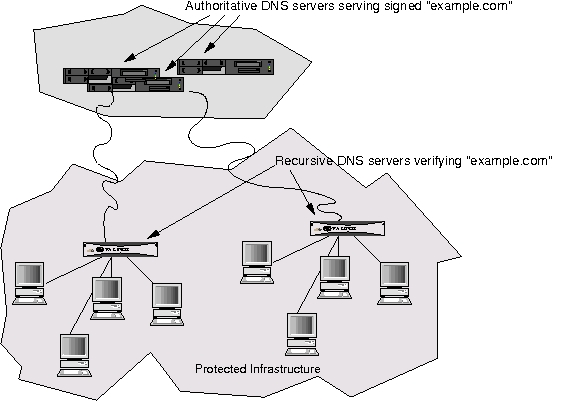
By configuring a public key for a specific zone, we tell the caching forwarder that all data coming from that zone should be signed with the corresponding private key. The zone acts as a secure entry point into the DNS tree and the key configured in the recursive name server acts as the start for a chain of trust. In an ideal situation you have only one key configured as a secure entry point: the key of the root zone.
We assume you have configured your name server to be recursive only.
We also assume that that name server in your organisation has been configured to run as an authoritative server for a secured zone called example.net. Notes on how to set up a secured zone can be found below in Chapter 2, “Securing a DNS zone”
1.2 Warning
Your recursive name server will treat the zones for which you configured trust anchors as being secured. If the zones for which you have configured trust anchors change their keys you will also have to reconfigure your trust anchors. Failure to do so will result in the data in these zones, or any child, being marked as bogus and therefore becoming invisible to users.
1.3 Configuring the caching forwarder
See AppendixA for information on compiling BIND with the correct switches to allow for DNSSEC. Do not forget enter the dnssec-enable yes; and dnssec-validation yes; statements in the options directive of your named.conf.2
1.3.1 Configuring a trust anchor
A trust anchor is a public key that is configured as the entry point for a chain of authority. In the ideal case —where the root is signed and chains of trusts can be constructed through top-level domains to end-nodes — validating name servers would only need one of these trust anchors to be configured. During early deployment you will probably want to configure multiple trust anchors.
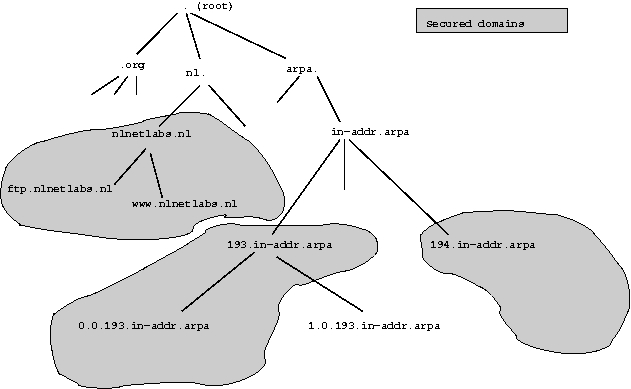
In Figure 2 we show a zone tree. In this tree, the domains ripe.net, 194.in-addr.arpa, 193.in-addr.arpa and 0.0.193.in-addr.arpa are assumed to be signed. It is also assumed that there is a secure delegation between 193.in-addr.arpa and 0.0.193.in-addr.arpa. In order to validate all these domains, the validating DNS client would have to configure trust anchors for ripe.net, 194.in-addr.arpa and 193.in-addr.arpa.3
To configure a trust-anchor you have to obtain the public key of the zone that you want to use as the start of the chain of authority that is to be followed when the data is validated. It is possible to get these straight from from the DNS, but there are two reasons why this may not be advisable.
Firstly, you have to establish the authenticity of the key you are about to configure as your trust anchor. How you do this depends on on what method the zone owner has made available for out of band validation of the key.
- You could do this by visiting the zone owners secure website and validate the key information. For instance, the RIPE NCC signs a number of reverse zones. They publish their public keys on through <https://www.ripe.net/projects/disi/keys/>
- You could give the zone owner a call if you personally know them.
- You could trust the key that is published on the bill you just received from the zone owner.
- You could just believe that your OS vendor did the validation on your behalf.
Secondly, you may have a choice of public keys, in which case you need to select the the proper ”Secure Entry Point” key.
In DNSSEC a difference is made between key- and zone-signing keys. Key-signing keys exclusively sign the DNSKEY RR set at the apex, while zone-signing keys sign all RR sets in a zone. 4. Key-signing keys are often used as Secure Entry Points (SEP) keys. These SEP keys are the keys intended to be first used when building a chain of authority from a trust anchor to signed data. We advise a one-to-one mapping between SEP keys and key-signing keys. In practise key-signing keys have a lower rollover frequency than zone-signing keys so you should configure the SEP i.e. key-signing keys.
In addition to having the proper public key you should either be aware of the rollover policy of the zone owner, or that you have a tool that takes care of automated rollover. Failure to modify the trust anchor before the corresponding SEP key is rolled will result in validation failures.
Assume you have obtained the key-signing keys of nlnetlabs.nl., 193.in-addr.arpa., and 195.in-addr.arpa.. To configure those key as a trust anchor you will have to include those keys using the trusted-keys directive in the named.conf of the recursive name server. See figure 3.
The format is similar to the DNSKEY RR except that the ”DNSKEY” label, the CLASS and the TTL, are omitted and quotes are placed around the name and the public key material.
1.3.2 Testing
As soon as a trusted-key has been configured, data from that zone or its sub zones will be validated by the caching forwarder. You can test this by querying your server5. If data is validated by the caching forwarder the ad-bit will be set by the name server (see the ’flags’ in the following example).
; <<>> DiG 9.4.1-P1 <<>> @192.168.2.204 example.net SOA +dnssec +multiline +retry=1
;; ->>HEADER<<- opcode: QUERY, status: NOERROR, id: 52761
;; flags: qr rd ra ad; QUERY: 1, ANSWER: 2, AUTHORITY: 2, ADDITIONAL: 3
; EDNS: version: 0, flags: do; udp: 4096
example.net. 100 IN SOA ns.example.net. olaf.nlnetlabs.nl. (
100 ; refresh (1 minute 40 seconds)
200 ; retry (3 minutes 20 seconds)
100 ; minimum (1 minute 40 seconds)
example.net. 100 IN RRSIG SOA 5 2 100 20070921083615 (
20070822083615 17000 example.net.
hF5zE2007NcvrGtvUQ0PIjBxVKS+fgsP5VQi3iRkbfny
Av0MiSIY7+Ectq8Zg9gxZCBfUErUXIPm+xfxOtguZTTN
/X3gAldOgG4Eo3FAu4pkOk95S3QM8AvCYXqigNIL6HlX
PHOCR490VJAhVv28dLmwIQDMOyJEPiIHaqmcTDY= )
example.net. 100 IN NS ns.example.net.
example.net. 100 IN RRSIG NS 5 2 100 20070921083615 (
20070822083615 17000 example.net.
jy/ARrpR/RwVhvCHNkNaEiXTKnw+zbWHK8zASnCrSHgd
4jt7Wdz4esrD5FivpE8xuSlGuu1RQOKCtFfAFwdhgrGb
Dzq+KbkgwE8yMWRrLqzp9WTeJNeVBZj2yijfxkgIyCKp
xHQJJ7aUMhbb+K3UmiVshXjRHqq/brGcHAKzya0= )
ns.example.net. 100 IN A 192.168.2.203
ns.example.net. 100 IN RRSIG A 5 3 100 20070921083615 (
20070822083615 17000 example.net.
VA7RgWoOCctvEJlo6e8yIw6t9ZvcZ+df4TU0oIUzmvzY
WpW/M1mxRaAhr9m0no+tLfx3rOCIl3ARTHNa/ayCEeae
NiShYUlMfMvjmrowuNlDmrbAsVkYZQTp+4cqVF7IsQ88
Fm846aPdTF7hPuLAMQBn/ptb8GyJ7mcxOVRq0J4= )
;; SERVER: 192.168.2.204#53(192.168.2.204)
It is important that you check that the validation is working correctly. This can be done by using the BIND log facilities on the machine that is configured as the validating recursive name server.
In BIND messages of a certain category can be logged to separate channels. The channels determine where the messages go and to what severity level they will need to be reported. The relevant category for DNSSEC validation is dnssec. In the example below the errors of the dnssec category are directed to the dnssec_log channel. In order to follow the validation process the channel has to log at least severity debug 3.
channel dnssec_log { // a DNSSEC log channel
print-time yes; // timestamp the entries
print-category yes; // add category name to entries
print-severity yes; // add severity level to entries
severity debug 3; // print debug message <= 3 t
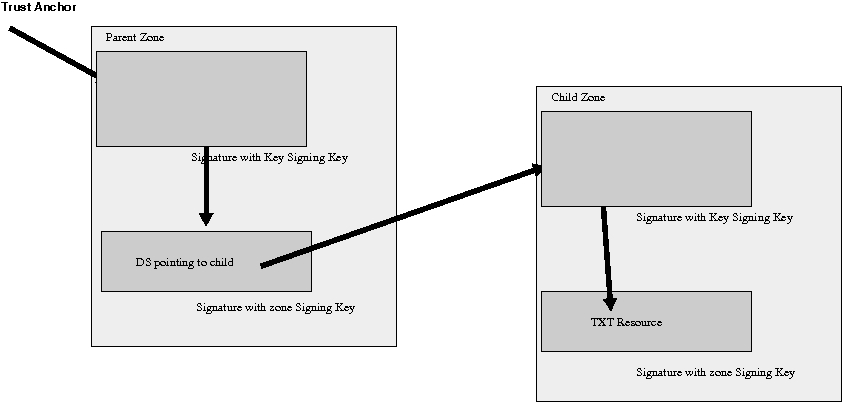
The output in the log file will look similar to the output below. The attempt for positive response validation shows how the validator tries to prove that the RR set is trusted by following the chain of trust to the appropriate secure entry point, your trusted-key statement. Chains of trust (see figure 4) start by the validation of a signature over a DNSKEY RRset, then these keys are used to validate the DS RRset that point to DNSKEY RRs in a child zone – which validates the DNSKEY RRs in the child zone –, or the DNSKEYs can be used to validate the data you have queried for. The log reflects the activity of the validator following the chain of trust.
validating @0x186bc00: example.net SOA: starting
validating @0x186bc00: example.net SOA: attempting positive response validation
validating @0x186c400: example.net DNSKEY: starting
validating @0x186c400: example.net DNSKEY: attempting positive response validation
validating @0x186c400: example.net DNSKEY: verify rdataset (keyid=49656): success
validating @0x186c400: example.net DNSKEY: signed by trusted key; marking as secure
validator @0x186c400: dns_validator_destroy
validating @0x186bc00: example.net SOA: in fetch_callback_validator
validating @0x186bc00: example.net SOA: keyset with trust 7
validating @0x186bc00: example.net SOA: resuming validate
validating @0x186bc00: example.net SOA: verify rdataset (keyid=17000): success
1.4 Finding trust-anchors
It is not trivial to find and maintain trust anchors. If you want to get started with validation of DNSSEC here are a few places where you can find more information.
- RIPE NCC maintains a set of keys on their secured website under https://www.ripe.net/projects/disi/keys/index.html (Note that this is a secured website, check the certificate).
- The Swedish TLD is signed. Its key can be found at https://dnssec.nic.se/key.html. (Also check the certificate of this site).
- The DNSSEC spider tries to locate secured zones and checks their status. You could use this site to find secured zones. See http://secspider.cs.ucla.edu/islands.html.
Since maintaining trust anchors is a pain you may also want to read the section 1.5 on lookaside validation.
1.5 Lookaside Validation
Remember figure 2. If you would like to validate all these islands you will have to configure many trust-anchors, as in the example in figure 3.
In order to deal with this problem in absence of secure delegation from a small set of trust-anchors (ideally only 1, the root), BIND supports, as of version 9.3.2, a 6 mechanism called lookaside validation [14, 13].
In the lookaside validation a DLV registry will maintain all the trust-anchors you trust them to do the “Good Thing”. The maintainers of zones that are secure register their trust-anchors with the DLV registry and (non-standard extensions) in BIND (as of 9.3.2) will allow you, operator of a validating nameserver, to make use of all trust anchors that are present in the DLV tree.
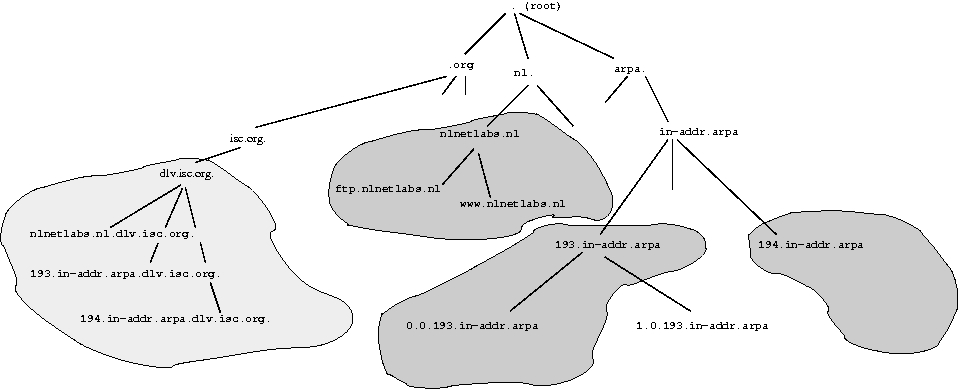
In the DLV scheme the trust anchors are published in a dedicated domain (dlv.isc.org in the figure 5). Whenever a validating resolver recognises that a zone is signed it will first try to validate it by assessing if it is within the island of trust configured by its local trust anchors. When the validated domain is not in a trusted island the resolver will lookup perform a lookup in the DLV domain and use the trust anchor from that zone if and when available.
1.5.1 Configuring lookaside validation
What follows is a generic description if you want to configure ISC’s DLV as your authoritative lookaside domain you may want to read http://www.isc.org/ops/dlv/.
In the example below we assume that dlv-registry.org is the registry of our choice.
You have to perform two (additional) steps in order to turn on lookaside validation.
Configure a trust anchor for the DLV registry. You do this by defining a trust anchor for the island of trust defined by dlv-registry.org in named.conf. Obviously, this trust-anchor is not exclusive, any trust-anchor configured in your trusted-keys statement will have preference over the data in the DLV registry.
// this trust-anchor defines dlv-registry.org as a trusted island.
"AQPXP7B3JTdPPhMl ... u82ggY2BKPQ==";
"AQPzzTWMz8qSWI ... zMG1UBYtEIQ==";
"AwEAAc2RnCT1gj ... pWaM8qXXPN8E=";
Configuring how the DNS name space anchors in the DLV name space. By using the dnssec-lookaside statement in the options section of named.conf. The statement takes two arguments the first one is the domain in the DNS for which lookaside validation is to be applied. Usually this will be the full name space so the "." (root) is configured. The second argument is the name of the trust-anchor where a lookup should be performed for a DLV record.
It is best to configure only one DLV trust-anchor.
// DNSSEC should be turned on, do not forget
// This sets the dlv registry "dlv-registry.org"
dnssec-lookaside "." trust-anchor "dlv-registry.org.";
testing When you have your logging configured as described in section 1.3.2 i.e. you log errors of the dnssec category are directed to a channel that logs at least at severity debug 3, then your log output when querying for example.net SOA will be similar to what is shown below.
First, the amount of log-ouput to validate one query covers more than one page of fine print. On a production server this data for several validation sequences will be print mixed. It will be very hard to debug from logfiles on production servers if you have not first looked at what happens for a single query.
Second, the structure is that the validator first finds DNSSEC RRs, notices that those records are not secure according ’plain DNSSEC’ and then moves to DLV validation.
Third, small chains of trust are build, from the DLV trust-anchor, via DNSKEY RRs to the signatures over the data. Trie to follow these trust anchors in the example output so it will be easier to identify them in production logs.
validating @0x186bc00: . NS: starting
validating @0x186bc00: . NS: looking for DLV
validating @0x186bc00: . NS: plain DNSSEC returns unsecure (.): looking for DLV
validating @0x186bc00: . NS: looking for DLV dlv-registry.org
validating @0x186bc00: . NS: DLV lookup: wait
validating @0x186c400: example.net SOA: starting
validating @0x186c400: example.net SOA: looking for DLV
validating @0x186c400: example.net SOA: plain DNSSEC returns unsecure (.): looking for DLV
validating @0x186c400: example.net SOA: looking for DLV example.net.dlv-registry.org
validating @0x186c400: example.net SOA: DNS_R_COVERINGNSEC
validating @0x186c400: example.net SOA: covering nsec: trust 1
validating @0x186c400: example.net SOA: DLV lookup: wait
validating @0x1876200: dlv-registry.org DLV: starting
validating @0x1876200: dlv-registry.org DLV: attempting negative response validation
validating @0x1876a00: dlv-registry.org SOA: starting
validating @0x1876a00: dlv-registry.org SOA: attempting positive response validation
validating @0x1877200: dlv-registry.org DNSKEY: starting
validating @0x1877200: dlv-registry.org DNSKEY: attempting positive response validation
validating @0x1877200: dlv-registry.org DNSKEY: verify rdataset (keyid=8916): success
validating @0x1877200: dlv-registry.org DNSKEY: signed by trusted key; marking as secure
validator @0x1877200: dns_validator_destroy
validating @0x1876a00: dlv-registry.org SOA: in fetch_callback_validator
validating @0x1876a00: dlv-registry.org SOA: keyset with trust 7
validating @0x1876a00: dlv-registry.org SOA: resuming validate
validating @0x1876a00: dlv-registry.org SOA: verify rdataset (keyid=27467): success
validating @0x1876a00: dlv-registry.org SOA: marking as secure
validating @0x1877200: example.net.dlv-registry.org DLV: starting
validating @0x1877200: example.net.dlv-registry.org DLV: attempting positive response validation
validating @0x1877200: example.net.dlv-registry.org DLV: keyset with trust 7
validating @0x1877200: example.net.dlv-registry.org DLV: verify rdataset (keyid=27467): success
validating @0x1877200: example.net.dlv-registry.org DLV: marking as secure
validator @0x1877200: dns_validator_destroy
validating @0x186c400: example.net SOA: in dlvfetched: success
validating @0x186c400: example.net SOA: DLV example.net found
validating @0x186c400: example.net SOA: dlv_validator_start
validating @0x186c400: example.net SOA: restarting using DLV
validating @0x186c400: example.net SOA: attempting positive response validation
validator @0x1876a00: dns_validator_destroy
validating @0x1876200: dlv-registry.org DLV: in authvalidated
validating @0x1876200: dlv-registry.org DLV: resuming nsecvalidate
validating @0x1876a00: dlv-registry.org NSEC: starting
validating @0x1876a00: dlv-registry.org NSEC: attempting positive response validation
validating @0x1876a00: dlv-registry.org NSEC: keyset with trust 7
validating @0x1876a00: dlv-registry.org NSEC: verify rdataset (keyid=27467): success
validating @0x1876a00: dlv-registry.org NSEC: marking as secure
validator @0x1876a00: dns_validator_destroy
validating @0x1876200: dlv-registry.org DLV: in authvalidated
validating @0x1876200: dlv-registry.org DLV: looking for relevant nsec
validating @0x1876200: dlv-registry.org DLV: nsec proves name exists (owner) data=0
validating @0x1876200: dlv-registry.org DLV: resuming nsecvalidate
validating @0x1876200: dlv-registry.org DLV: nonexistence proof(s) found
validator @0x1876200: dns_validator_destroy
validating @0x186bc00: . NS: in dlvfetched: ncache nxrrset
validating @0x186bc00: . NS: DLV not found
validating @0x186bc00: . NS: marking as answer
validator @0x186bc00: dns_validator_destroy
validating @0x186bc00: example.net DNSKEY: starting
validating @0x186bc00: example.net DNSKEY: looking for DLV
validating @0x186bc00: example.net DNSKEY: plain DNSSEC returns unsecure (.): looking for DLV
validating @0x186bc00: example.net DNSKEY: looking for DLV example.net.dlv-registry.org
validating @0x186bc00: example.net DNSKEY: DLV example.net found
validating @0x186bc00: example.net DNSKEY: dlv_validator_start
validating @0x186bc00: example.net DNSKEY: restarting using DLV
validating @0x186bc00: example.net DNSKEY: attempting positive response validation
validating @0x186bc00: example.net DNSKEY: dlv_validatezonekey
validating @0x186bc00: example.net DNSKEY: Found matching DLV record: checking for signature
validating @0x186bc00: example.net DNSKEY: verify rdataset (keyid=17000): RRSIG failed to verify
validating @0x186bc00: example.net DNSKEY: verify rdataset (keyid=49656): success
validating @0x186bc00: example.net DNSKEY: marking as secure
validator @0x186bc00: dns_validator_destroy
validating @0x186c400: example.net SOA: in fetch_callback_validator
validating @0x186c400: example.net SOA: keyset with trust 7
validating @0x186c400: example.net SOA: resuming validate
validating @0x186c400: example.net SOA: verify rdataset (keyid=17000): success
When using lookaside validation assessing the log output in case of corrupted zone data is a challenge. Below is the output of the validator when it tries to figure out if a query that returns a corrupted result is valid or not. The conclusion is reached in the last few lines.
validating @0x186bc00: . NS: starting
validating @0x186bc00: . NS: looking for DLV
validating @0x186bc00: . NS: plain DNSSEC returns unsecure (.): looking for DLV
validating @0x186bc00: . NS: looking for DLV dlv-registry.org
validating @0x186bc00: . NS: DLV lookup: wait
validating @0x1875200: corrupt.example.net A: starting
validating @0x1875200: corrupt.example.net A: looking for DLV
validating @0x1875200: corrupt.example.net A: plain DNSSEC returns unsecure (.): looking for DLV
validating @0x1875200: corrupt.example.net A: looking for DLV corrupt.example.net.dlv-registry.org
validating @0x1875200: corrupt.example.net A: DNS_R_COVERINGNSEC
validating @0x1875200: corrupt.example.net A: covering nsec: trust 1
validating @0x1875200: corrupt.example.net A: DLV lookup: wait
validating @0x186c400: dlv-registry.org DLV: starting
validating @0x186c400: dlv-registry.org DLV: attempting negative response validation
validating @0x1876a00: dlv-registry.org SOA: starting
validating @0x1876a00: dlv-registry.org SOA: attempting positive response validation
validating @0x1877200: corrupt.example.net.dlv-registry.org DLV: starting
validating @0x1877200: corrupt.example.net.dlv-registry.org DLV: attempting negative response validation
validating @0x1877a00: dlv-registry.org SOA: starting
validating @0x1877a00: dlv-registry.org SOA: attempting positive response validation
validating @0x1878200: dlv-registry.org DNSKEY: starting
validating @0x1878200: dlv-registry.org DNSKEY: attempting positive response validation
validating @0x1878200: dlv-registry.org DNSKEY: verify rdataset (keyid=8916): success
validating @0x1878200: dlv-registry.org DNSKEY: signed by trusted key; marking as secure
validator @0x1878200: dns_validator_destroy
validating @0x1876a00: dlv-registry.org SOA: in fetch_callback_validator
validating @0x1876a00: dlv-registry.org SOA: keyset with trust 7
validating @0x1876a00: dlv-registry.org SOA: resuming validate
validating @0x1876a00: dlv-registry.org SOA: verify rdataset (keyid=27467): success
validating @0x1876a00: dlv-registry.org SOA: marking as secure
validator @0x1876a00: dns_validator_destroy
validating @0x186c400: dlv-registry.org DLV: in authvalidated
validating @0x186c400: dlv-registry.org DLV: resuming nsecvalidate
validating @0x1877a00: dlv-registry.org SOA: in fetch_callback_validator
validating @0x1877a00: dlv-registry.org SOA: keyset with trust 7
validating @0x1877a00: dlv-registry.org SOA: resuming validate
validating @0x1877a00: dlv-registry.org SOA: verify rdataset (keyid=27467): success
validating @0x1877a00: dlv-registry.org SOA: marking as secure
validator @0x1877a00: dns_validator_destroy
validating @0x1877200: corrupt.example.net.dlv-registry.org DLV: in authvalidated
validating @0x1877200: corrupt.example.net.dlv-registry.org DLV: resuming nsecvalidate
validating @0x1877a00: example.net.dlv-registry.org NSEC: starting
validating @0x1877a00: example.net.dlv-registry.org NSEC: attempting positive response validation
validating @0x1877a00: example.net.dlv-registry.org NSEC: keyset with trust 7
validating @0x1877a00: example.net.dlv-registry.org NSEC: verify rdataset (keyid=27467): success
validating @0x1877a00: example.net.dlv-registry.org NSEC: marking as secure
validator @0x1877a00: dns_validator_destroy
validating @0x1877200: corrupt.example.net.dlv-registry.org DLV: in authvalidated
validating @0x1877200: corrupt.example.net.dlv-registry.org DLV: looking for relevant nsec
validating @0x1877200: corrupt.example.net.dlv-registry.org DLV: nsec range ok
validating @0x1877200: corrupt.example.net.dlv-registry.org DLV: resuming nsecvalidate
validating @0x1877200: corrupt.example.net.dlv-registry.org DLV: in checkwildcard: *.example.net.dlv-registry.org
validating @0x1877200: corrupt.example.net.dlv-registry.org DLV: looking for relevant nsec
validating @0x1877200: corrupt.example.net.dlv-registry.org DLV: nsec range ok
validating @0x1877200: corrupt.example.net.dlv-registry.org DLV: nonexistence proof(s) found
validator @0x1877200: dns_validator_destroy
validating @0x1875200: corrupt.example.net A: in dlvfetched: ncache nxdomain
validating @0x1875200: corrupt.example.net A: looking for DLV example.net.dlv-registry.org
validating @0x1875200: corrupt.example.net A: DLV lookup: wait
validating @0x1876a00: dlv-registry.org NSEC: starting
validating @0x1876a00: dlv-registry.org NSEC: attempting positive response validation
validating @0x1876a00: dlv-registry.org NSEC: keyset with trust 7
validating @0x1876a00: dlv-registry.org NSEC: verify rdataset (keyid=27467): success
validating @0x1876a00: dlv-registry.org NSEC: marking as secure
validator @0x1876a00: dns_validator_destroy
validating @0x186c400: dlv-registry.org DLV: in authvalidated
validating @0x186c400: dlv-registry.org DLV: looking for relevant nsec
validating @0x186c400: dlv-registry.org DLV: nsec proves name exists (owner) data=0
validating @0x186c400: dlv-registry.org DLV: resuming nsecvalidate
validating @0x186c400: dlv-registry.org DLV: nonexistence proof(s) found
validator @0x186c400: dns_validator_destroy
validating @0x186bc00: . NS: in dlvfetched: ncache nxrrset
validating @0x186bc00: . NS: DLV not found
validating @0x186bc00: . NS: marking as answer
validator @0x186bc00: dns_validator_destroy
validating @0x186bc00: example.net.dlv-registry.org DLV: starting
validating @0x186bc00: example.net.dlv-registry.org DLV: attempting positive response validation
validating @0x186bc00: example.net.dlv-registry.org DLV: keyset with trust 7
validating @0x186bc00: example.net.dlv-registry.org DLV: verify rdataset (keyid=27467): success
validating @0x186bc00: example.net.dlv-registry.org DLV: marking as secure
validator @0x186bc00: dns_validator_destroy
validating @0x1875200: corrupt.example.net A: in dlvfetched: success
validating @0x1875200: corrupt.example.net A: DLV example.net found
validating @0x1875200: corrupt.example.net A: dlv_validator_start
validating @0x1875200: corrupt.example.net A: restarting using DLV
validating @0x1875200: corrupt.example.net A: attempting positive response validation
validating @0x186bc00: example.net DNSKEY: starting
validating @0x186bc00: example.net DNSKEY: looking for DLV
validating @0x186bc00: example.net DNSKEY: plain DNSSEC returns unsecure (.): looking for DLV
validating @0x186bc00: example.net DNSKEY: looking for DLV example.net.dlv-registry.org
validating @0x186bc00: example.net DNSKEY: DLV example.net found
validating @0x186bc00: example.net DNSKEY: dlv_validator_start
validating @0x186bc00: example.net DNSKEY: restarting using DLV
validating @0x186bc00: example.net DNSKEY: attempting positive response validation
validating @0x186bc00: example.net DNSKEY: dlv_validatezonekey
validating @0x186bc00: example.net DNSKEY: Found matching DLV record: checking for signature
validating @0x186bc00: example.net DNSKEY: verify rdataset (keyid=17000): RRSIG failed to verify
validating @0x186bc00: example.net DNSKEY: verify rdataset (keyid=49656): success
validating @0x186bc00: example.net DNSKEY: marking as secure
validator @0x186bc00: dns_validator_destroy
validating @0x1875200: corrupt.example.net A: in fetch_callback_validator
validating @0x1875200: corrupt.example.net A: keyset with trust 7
validating @0x1875200: corrupt.example.net A: resuming validate
validating @0x1875200: corrupt.example.net A: verify rdataset (keyid=17000): RRSIG failed to verify
validating @0x1875200: corrupt.example.net A: failed to verify rdataset
validating @0x1875200: corrupt.example.net A: verify failure: RRSIG failed to verify
validating @0x1875200: corrupt.example.net A: no valid signature found
1.6 Some Troubleshooting Tips
Suppose that you have configured a trust anchor and you are experiencing problems. For instance, your nameserver returns “SERVFAIL” for particular queries. Well, “SERVFAIL” is the default return code that a validating nameserver returns when it flags data as being bogus. Bogus data can be caused by two things. Either you are under attack or you experiencing a configuration error either by the operator of one of the zones in the chain of trust or by the operator of the validating recursive nameserver.
In addition to looking at the logs there are a number of tools at your disposal (see III). To assess if problems occur because of misconfiguration, or bugs, in you validating nameserver, or because of problems with the signed zones you will need a troubleshooting strategy.
One of the approaches you could take is to first use drill (see 6) or dig (see 7) to perform a ’sigchase’ or a ’trace’ with a key copied to your local file system, circumventing you validating recursive nameserver. In that way you will be able to check if the chain of trust can actually be built from the data. Make sure you use the correct trust-anchor when tracing data.
When you have verified that the chain of trust can be build from the data in the DNS it is time to troubleshoot the validating nameserver. This is easy when you have access to the log files but may be more troublesome if you don’t. You could use dig to query the validating nameservers with and without the +cd flag. That flag sets a bit in the query that instructs the nameserver not to perform validation. When the individual pieces in the chain of trust (drill returned those when using the trace option) you may be able to find inconsistencies that indicate that an expired trust anchor has been configured. You start by querying the DNSKEY RRset for which you assume there is a trust-anchor considered and work your way down. Or, alternatively, you query for the data you were looking for, use the data in the RRSIG RR to find for which DNSKEY RR to query, then query for a DS RR at the same name and work your way up (similar to the ’sigchase’ in drill).
While troubleshooting there are a number of failures that are easily introduced. Take the following example.
In his ISP column [8, 7, 6], Geoff Huston documented his experiences as an early deployer. He blindly configured a trust-anchor for the “nlnetlabs.nl” zone. While this zone was signed it was done in an experimental setup whereby not all servers for the zone were configured with the same version of the protocol. In this case one of the servers would not provide RRSIGs with the answer, something which may give rise to re-occurring but hard to predict failures.
There are two things to learn from this: Never blindly configure trust anchors in validating resolvers and make sure that when you serve zones all your servers conform to the DNSSEC protocol specification.
Another failure is that one of the RRsets in the chain of trust has expired signatures. Check this by looking at the date fields in the RRSIG RRs.
More problematic to find may be a rollover, where DNSKEY RRs or RRSIG RRs have been removed to early so that there is an inconsistency between data in cache and data that needs to be validated (also see section 4). Using the +cd to with dig and looking at the TTLs might help to distinguish if you are trying to validate RRSIGs for which there are no DNSKEYs available (or vice versa).
2 Securing a DNS zone
2.1 Introduction
If a zone has been signed and its key has been configured in a validating recursive name server we usually refer to it as being an ”island of security”. It apparently does not have a secured parent and stands alone in the sea of other unsecured domains. Usually creating an ”island of security” is the first step to becoming part of the secure DNS. The ”island of security” will remain ”insecure” for resolvers that have no trust anchor configured for the domain.
If a zone owner decides to create ”an island of security” she will sign her zones and distribute the ”secure entry points” to the system administrators that want to validate her zone data. Once the island of security has been set up the island can become part of the secure tree by exchanging the ”secure entry point” with the parent.
After creation of the key-pairs used for signing and validation we want to sign the zone data for our own organisation (e.g. example.net.) and configure the caching forwarders on our organisations network to validate data against the public key of our organisation.
In the text below, we assume that your organisation’s domain names are maintained in one zone. If domain name administration is delegated to sub-zones, see section Chapter 3, “Delegating of signing authority; becoming globally secure”.
Signing the zone data is the task of the zone administrator, configuring the caching forwarder is a task of system administrators.
The examples are based on the example zone in section Figure 7.
2.2 Configuring authoritative servers
All the authoritative servers will need to be configured to deal with the DNSSEC protocol. How this is done for BIND is explained in AppendixA. The essential steps are compiling bind with openssl and enabling dnssec through the use of the dnssec-enable yes; directive in the options section of named.conf.
That is all there is to it.
2.3 Creating key pairs
2.3.1 Key Maintenance Policy
Before generating keys, you will need to think about your key maintenance policy. Such policy should address
- What will be the sizes of your keys?
- Will you separate the key- and zone-signing keys functionality?
- How often will you roll the keys?
- How will system administrators that intend to use your zone as a trust anchor get hold of the appropriate public key and what mechanism will you provide to enable them to validate the authenticity of your public key?
- How will you signal a key rollover or how can you make sure that all interested parties are aware of a rollover?
Some of these issues may be easy to address. For example, your organisation may have established mechanisms to distribute the public keys, there may be obvious ways to publish an upcoming rollover such as the possibility of publishing the event in a corporate newspaper. Alternatively, it may be possible to notify all relevant parties by mail when a corporate X.509 hierarchy is available for e-mail validation.
Key- and zone-signing keys. The author thinks it is good practise to use zone-signing keys and key-signing keys (also see Chapter 4, “Rolling keys”). The key-signing keys are usually the first keys from your zone that are used to build a chain of authority to the data that needs to be validated. Therefore, these keys are often called a secure entry point key (or SEP key). These SEP keys are the ones that you should exchange with your parents or that validating resolvers configure as their trust anchors.
Throughout this document we assume that you use separate key- and zone-signing keys and that the key-signing keys are exclusively used as secure entry point keys and can be identified by the SEP[10] bit in the flag field; the flag field is odd.
2.3.2 Creating the keys
|
dnssec-keygen -a alg -b bits -n type [options] name -a algorithm: RSA | RSAMD5 | DH | DSA | RSASHA1 | HMAC-MD5 | HMAC-SHA1 | HMAC-SHA224 | HMAC-SHA256 | HMAC-SHA384 | HMAC-SHA512 DSA: [512..1024] and divisible by 64 -n nametype: ZONE | HOST | ENTITY | USER | OTHER -d <digest bits> (0 => max, default) -e use large exponent (RSAMD5/RSASHA1 only) -g <generator> use specified generator (DH only) -t <type>: AUTHCONF | NOAUTHCONF | NOAUTH | NOCONF (default: AUTHCONF) -p <protocol>: default: 3 [dnssec] -s <strength> strength value this key signs DNS records with (default: 0)
|
dnssec-keygen is the tool that we use to generate key pairs. The arguments that we have to provide dnssec-keygen are shown in Figure 6.
The output can be found in two files. The name of the files contain relevant information:
Kdomain_name+algorithm_id+key_id.extension
The domain_name is the name specified on the command line. It is used by other BIND DNSSEC tools, if you use a different name from the domain name, you might confuse those tools. The algorithm_id identifies the algorithm used: 1 for RSAMD5, 3 for DSA, 5 for RSASHA1 and 54 for HMAC-MD5 (TSIG only). The key_id is an identifier for the key material. This key_id is used by the RRSIG Resource Record. The extension is either key or private, the first is the public key, the second is the private key.
We create an RSASHA1 zone-signing key pair for example.net:
Because of the considerations in Section 2.3.1 you will also need to create SEP keys. Create keys with the SEP bit set by specifying the -f KSK flag with dnssec-keygen.
Lets have a look at the content of these files7
cat Kexample.net.+005+17000.key
example.net. IN DNSKEY 256 3 5 (
AQPI4+0M1V055RS2Hqv+8w8V20Dh+SQmFzHQtZMuzLH3UxWE0GmG5Gfj
The public key (.key extension) is exactly as it appears in your zone file. Note, that the TTL value is not specified. This key has a ”flag” value of 256. Since this value is an even number, the key is not marked as a SEP key and should be used for zone-signing.
The private key (.private extension) contains all the parameters that make an RSASHA1 private key. The private key of a RSA key contains different parameters to DSA. Here is the private key (with base64 material truncated):
cat Kexample.net.+005+17000.private
Modulus: yOPtDNVdOeUUth6r/vMPFdtA4fkkJhcx0LWTLsyx91MVhNBphu...
PrivateExponent: he1Iszjo0UNjJBRyqfdfY+eAlqYYGWTL4HkMyd3L+j...
Prime1: +X0kNW1JrepBnVw5o9fDUyWAT5zqxKt0YR4vJZ19991tLZAmdO4...
Prime2: ziIX5qfpZGBuzfd847TqtDfYcwv5UfUrPAIa/11g3leUUNERmsB...
Exponent1: plNtePOGc/GBE5LRF+Us4hkANRNHLcei62l0w75T+pOeHmAZ...
Exponent2: iWwP7xqbmEBJ3qT97SNHIs/logf7i/jHfVa8qj5AlDpi4Ith...
Coefficient: rmmgD9P7/ywQJ4F0epdGqOUoQZmqrPQsraDTD8vkU1wLju...
This private key should be kept secure8 i.e. the file permissions should be set so that the zone administrator will be able to access them when a zone needs to be signed. The BIND tools will, by default,9 look for the keys in the directory where signing is performed (see Section 2.4), that might not be the most secure place on your OS.
2.4 Zone-signing
When you create key pairs, you should include them in your zone file. Refer to the example in Figure7, where we use the $include directive to include the keys. We increase the serial number in the SOA record before signing.
In the example below we will use the RSASHA1 type keys for zone and key-signing keys.
|
@ 100 IN SOA ns.example.net. ( ns.example.net. A 192.168.2.203 ; These are the keys that need to be publised in the DNSKEY RRset
|
Once the key is included in the zone file we are ready to sign the zone using the dnssec-signzone tool (see Figure 8 for all the arguments). We use the -o flag to specify the origin of the zone; by default the origin is deduced from the zone file name.
With the ’-k key_name’ we specify which key is to be used as the key-signing key. That key will only sign the DNSKEY RR set in the apex of the zone. The keys that come as arguments at the end of the command are used to sign all the RR data for which the zone is authoritative. If you do not specify the keys, BIND will use the ones for which the public keys are included in the zone and use the SEP flag to distinguish between key- and zone-signing keys.
In practise you would not want to rely on the default, since in key rollover scenarios you will have a public key in your zone file but you would not want to use that for zone-signing (in order to avoid double signatures and therefore longer signature generation times and more resource consumption on your name server). Below is the command issued to sign a zone with the 49656 key as key-signing key and the 17000 key as zone-signing key.
The signed zone file is reproduced in figure 2.4 . Note that the apex DNSKEY RRset is the only RRset with two signatures, made with the zone- and key-signing keys. The other RRsets are only signed with the zone-signing keys.
The signing process completed the following:
- Sorted the zone in ’canonical’ order10.
- Inserted NSEC records for every label.
- Added the key-id as a comment to each DNSKEY-record.
- Signed the DNSKEY RR set with two keys; the key-signing key and the zone-signing key.
- Signed the other RRs with the zone-signing key.
- It created two files, dsset-example.net and keyset-example.net. These two files are relevant when building a chain of trust. Per default the files are created in the ’current directory’ i.e. the directory in which you ran thednssec-signzone command, but when specifying the -d, with its directory, then the files end up there.
The signatures were created with a default life time of 30 days from the moment of signing. Once signatures have expired data can not be validated and your zone will marked ’bogus’. Therefore you will have to re-sign your zone within 30 days. Zone re-signing is discussed below.
The signed zone is stored in db.example.net.signed, make sure you have configured named to use this file to serve the zones from.
|
dnssec-signzone [options] zonefile [keys] Options: (default value in parenthesis) directory to find keyset files (.) -g: generate DS records from keyset files RRSIG start time - absolute|offset (now - 1 hour) -e [YYYYMMDDHHMMSS|+offset|"now"+offset]: RRSIG end time - absolute|from start|from now (now + 30 days) cycle interval - resign if < interval from end ( (end-start)/4 ) randomize signature end time up to jitter seconds zone origin (name of zonefile) file the signed zone is written in (zonefile + .signed) file format of input zonefile (text) file format of signed zone file (text) soa serial format of signed zone file (keep) -a: verify generated signatures -p: use pseudorandom data (faster but less secure) -n ncpus (number of cpus present) -z: ignore KSK flag in DNSKEYs Signing Keys: (default: all zone keys that have private keys) keyfile (Kname+alg+tag)
|
|
; File written on Wed Aug 22 11:36:14 2007 ; dnssec\_signzone version 9.4.1-P1 example.net. 100 IN SOA ns.example.net. olaf.nlnetlabs.nl. ( 100 ; refresh (1 minute 40 seconds) 200 ; retry (3 minutes 20 seconds) 100 ; minimum (1 minute 40 seconds) 100 RRSIG SOA 5 2 100 20070921083614 ( 20070822083614 17000 example.net. U9hMfeJiAs6aNn7bj++g1FDVslHoTfvMCXMB y94EwaJMwKsukQ+pHUheStvxF4iksEOmcV0v ab2ZuwAazATZLzsWfjn4RbcM7U9EE3WQoaiT AWuADMM8OGPDX1lR5Ynk4c9bpL5MNKSd/u9G AOvceMDEjGFkebgBKWS9Z/PtAA0= ) 100 RRSIG NS 5 2 100 20070921083614 ( 20070822083614 17000 example.net. rOzRinjHQzWqNvLUhzk/oXlyx59kyZf0zV5U MF+HzWxIlGHZtYWOJGE09sibWPl8L9k6/JbX dsWdPKiyNn5MvCZ+y9BdmuFVUW305SXiwynG /vzZW6UdC/rmQPCY7MP8uyUaHX/POPVtSIkb K75G1a4jKMWWb1qcqb2IiHo/2VQ= ) 100 NSEC *.example.net. NS SOA RRSIG NSEC DNSKEY 100 RRSIG NSEC 5 2 100 20070921083614 ( 20070822083614 17000 example.net. LXBHKZzPLfN7UxmsUnbx1gtUXxgHuTF6mpio mfJpTA2+g4vXmL4T0PkLcgob1TlnwsMtrH4f h7+HnNmOFEe+kqbXDa+tcCm6PtVu7TqEBO2x IIew271xiqS+Ia4f9ksPWF+pD6c4Z3SnuEwL /0ta6G/AupVD2sX7urHD0As2auY= ) AQPI4+0M1V055RS2Hqv+8w8V20Dh+SQmFzHQ tZMuzLH3UxWE0GmG5GfjijandJeAZTKLpERX B6RfHTHGG8lD3IO1azWN6DiVFEVzgr0otAdD onfYF8gUT03ZnRcXlkJk41h12NOfq6rkODaF nfMHCppI3WZ/MJqe+9hLJtis+oEsRw== AQOzgs4qea+ImJ1OCworkabHqFnvPKybVT7b nDIkJ2HvXWslbwNWJ66Ox3N6ftpCTc9wWBMw 5+xOh7ilTwFPruMa2gURwEywZaMG9ipILOXm KO4a5I+8R2QTH4BM0WaIKnv5jCHose/l9LL3 Y8MApsjP6gOWNM8b9aVTjBFnf0xEF7sOSBBB
|
|
20070822083614 17000 example.net. LXLxA/ECoylvwW2yo8D9DNaMZ59PBS+lXDAF PJg19e935p7lr8tLtBmxhhMUctcfANobkBA9 IJZRXD/hCCxzq6yEtVeWPyCc2hX0ZlV5PtAM bmTOWYFebEta9oaFUrC5qop+S28Di62bfclD FgqnCPOPZkFD3ueCqlBdbtV3TVo= ) 100 RRSIG DNSKEY 5 2 100 20070921083614 ( 20070822083614 49656 example.net. SWlHzmbvNGNsBGlqdx/K7RF3FMMMRKzkFKok XeOH82lm/apBjBQ5J+IwModHCfDtWWEu/QLw areD3iDGNy3rk530CGtYeRomqiNb/Xrv6X0v n/8krbcV/6QxNwmlPs1cBC84dXmaOQ5jttOJ mBKj9o9I+sjdujp6nxb3emsnTVmNK+Siv78k mBdTJgnG6rNCxwfNJMOa1+3FBNx6HfuwKg== ) *.example.net. 100 IN A 192.168.2.10 100 RRSIG A 5 2 100 20070921083614 ( 20070822083614 17000 example.net. VVMxoTePJsLt/ZaTC9zpMySxWtNcz+R7RuIM zQSpEPSlm9wF1bApKNJC9xf1kUWFUmmN+cXj IsGrfMB4JW1/e+HVMRfIibzIcbQg3xmt42eo qudbBFgjgTUpjNj6HEYywPqUecFAD8TLLL9B vHx0HwlRFnxSGzO0f/1s4NQWmiY= ) 100 NSEC a.example.net. A RRSIG NSEC 100 RRSIG NSEC 5 2 100 20070921083614 ( 20070822083614 17000 example.net. lKGp1n+j6a65GPgvsgKPohZH8ITlEVcYtdKe SUfWsEWe+Fm0h6dfTvRQb2ylqIsPTMjzIJXS 088lKhUX5emSV7Pp9/elY8h0E6cXRdrzEJKk Jhh1fdDG4caGu6yHAaoAotI1Mo6yrL/Kr+wH mzGd+wSB3r3/GYTZsDqDPp1aah8= ) a.example.net. 100 IN A 192.168.2.1 100 RRSIG A 5 3 100 20070921083614 ( 20070822083614 17000 example.net. H81aKqnGh2+Q7R7vA+O1Eepwn/5AnjDJGHl+ yCU7uf+zgfI28d/bp23aJROzZABq04EBdc7v 48cqEf4jcpwgHykW4LRgy9o3c162RWaDoRrX oWHubYHJU6HEY69Pl7pbD4ryz3itmghYUlwz 15nJ5wVQjYSJgMOcZ8MpHO20HzU= ) 100 NSEC b.a.example.net. A RRSIG NSEC 100 RRSIG NSEC 5 3 100 20070921083614 ( 20070822083614 17000 example.net. iiYhMLbmgdunr/HrhcCRZ+0COsJsFe7/9BNN WWwjgyZfFvhAnxak5EFxsB31jbT52hsLUsn9 XQNoBcWaZgHjnkrEgw+2UyeNOOSG8nNPpDMw UF4FVBBS3PE2HCJ6EhtJzm21yWvAA2nkcxI4 8b+Vrv2C/HoZFXZ6iWjsXWDfiDI= ) b.a.example.net. 100 IN A 192.168.2.11 100 RRSIG A 5 4 100 20070921083614 (
|
|
pMxWIdaaCl8eOhooY7NVc38TqLSN2mTPdTU8 WRU0t9iXXfqMlbdzVbCKgW4HPpEilCjABo1M U3o0vpZagr8odp9Q6Oxlb1MntSA= ) 100 NSEC b.example.net. A RRSIG NSEC 100 RRSIG NSEC 5 4 100 20070921083614 ( 20070822083614 17000 example.net. eIeNU2T4VFcdZPEeWRlup2TRP51EQbVNkvnu /mexajPrqbnbfq1JV3EnIMszE+RSXOMwJ+OU kMUAhKyta5PhnnDfbwOrfTrD/z8DOcd13bQv 6NqRaPVUolObj7OrRBH+iZBedLBG8P3aPgsb 6RfRk9CKE1eigygUg7rspISmjc4= ) b.example.net. 100 IN A 192.168.2.2 100 RRSIG A 5 3 100 20070921083614 ( 20070822083614 17000 example.net. PePJMo5cgNumk1lGVCjl0iG/fxNxyry/Fzfz 0wiiWj5T0qHMDMCeBr99IisPo5NfqkXFxA6i uK46Hflaja0AvY151WN186bE/zZh/LoT6CZu jFI21bOpL9+AegQLovjW41MV4aXHWu6a2gzU cikVYyJ377g5yTndy/dIJFTkUZ4= ) 100 NSEC ns.example.net. A RRSIG NSEC 100 RRSIG NSEC 5 3 100 20070921083614 ( 20070822083614 17000 example.net. rK7hoZHGtTFuzep/yoh4QbQDSFxo20mC7F+U IEm6CEgfrli9q1yL58Ikuxgg9BcahKI/QGup ukfqo9kVRqspojtH7cUqRyYPr7m7WUDfNimn doYZ6/99tb4cXFa0WS3wAPwPCE3GCKslZNbH PMGP59PQIPseqsNIDc0toQxxdpI= ) ns.example.net. 100 IN A 192.168.2.203 100 RRSIG A 5 3 100 20070921083614 ( 20070822083614 17000 example.net. oQIH3uWW4J8DmgRZE+9Pp5yPzL0zTxXTVM0/ BKFoKHfrt4ujKhySWV0L2v7lwjFG3N7G9c4n 4oweuTHQlKkzM+jiX2j3GFDdJdJEVQvh0Y3p bZd/fUFYviR/ySDlnSDI+CL+RCQ1lWlWlPK6 wZOMti9C4Dk/75zlDZsORB6rCRg= ) 100 NSEC example.net. A RRSIG NSEC 100 RRSIG NSEC 5 3 100 20070921083614 ( 20070822083614 17000 example.net. U5M1ZZVEZSux+NebdAw+GVHL/odzHsWc1e0G BT8FIJN/5MSSOaTKEXMBWNXKqWBi7gZbRSv5 7OMA3ScqWCppE4goyldVIUiFCynjm1LMhwRt
|
2.5 Caching forwarder configuration
Now the DNS servers publish signed data, we need to configure the ’clients’ to validate it. The clients in this context are recursive name servers. Just configure your recursive name server with the public SEP key generated for the zone. This is described in Section 1.3 (above), also see Figure 3.
2.6 Zone Re-Signing
When the signatures in your zone are due to expire or if you have added new records to your zone, you will have to re-sign your zone. There are two ways to re-sign your zone data. You may choose either option depending on levels of automation, the zone size and the frequency with RRSIG RRs are generated.
- You can regenerate the signed zone from the unsigned zone file. The signer
will need to sort the zone again, generate all the NSEC records and generate
all RRSIG records.
If you generate your zone file from a back-end database this is probably the preferred method.
- You can add the new records to the already signed zone file and then run that zone file through the signer. The BIND signer will insert new records and associate NSECs in the already sorted zone file and will only sign new records and records for which the signatures are reaching the end of their validity period.
You should build tools to maintain your signed zones e.g.: using cron, perl and make. (also see Appendix D)
2.7 Troubleshooting Signed Zones
You can check the format of your named.conf using the named-checkconf program. The named-checkzone program can be used to check zone files. These programs use the same routines to parse the configuration and zone files as named but only check syntax.
One can use dig and a name server configured with a trusted-key to validate ones setup. If data cannot be cryptographically validated, the forwarder will return with a SERVFAIL status. You can test this by intentionally corrupting a resource record in the signed zone file. This is typical output of dig when querying for corrupted data 11:
; <<>> DiG 9.4.1-P1 <<>> @192.168.2.204 corrupt.example.net A +dnssec +multiline +retry=1
;; ->>HEADER<<- opcode: QUERY, status: SERVFAIL, id: 61491
;; flags: qr rd ra; QUERY: 1, ANSWER: 0, AUTHORITY: 0, ADDITIONAL: 1
; EDNS: version: 0, flags: do; udp: 4096
;; SERVER: 192.168.2.204#53(192.168.2.204)
Note that a caching forwarder will not do cryptographic validation of the zones for which it is authoritative. Therefore, if your caching forwarder is a primary or secondary server for a particular zone you will always get an answer as it is assumed that data from disk is secure.
Further troubleshooting needs to be done on a a server configured as a validating recursive name server. Below is an example of the log output of the validating nameserver when we queried for corrupted data.
validating @0x186bc00: corrupt.example.net A: starting
validating @0x186bc00: corrupt.example.net A: attempting positive response validation
validating @0x186c400: example.net DNSKEY: starting
validating @0x186c400: example.net DNSKEY: attempting positive response validation
validating @0x186c400: example.net DNSKEY: verify rdataset (keyid=49656): success
validating @0x186c400: example.net DNSKEY: signed by trusted key; marking as secure
validator @0x186c400: dns_validator_destroy
validating @0x186bc00: corrupt.example.net A: in fetch_callback_validator
validating @0x186bc00: corrupt.example.net A: keyset with trust 7
validating @0x186bc00: corrupt.example.net A: resuming validate
validating @0x186bc00: corrupt.example.net A: verify rdataset (keyid=17000): RRSIG failed to verify
validating @0x186bc00: corrupt.example.net A: failed to verify rdataset
validating @0x186bc00: corrupt.example.net A: verify failure: RRSIG failed to verify
validating @0x186bc00: corrupt.example.net A: no valid signature found validator @0x186bc00: dns_validator_destroy
(This output was generated by using the dnssec category to a logging channel with severity debug 3; configured.)
2.8 Possible problems
- SOA serial
- If you forget to increase the serial number before re-signing your zone, secondary servers may not pick up the new signatures. This may cause some of the authoritative servers to time out so some resolvers will be able to validate your signature while others will not.
- ’Zone-signing key’ rollover
- If a zone administrator makes a distinction
between zone and key-signing keys then the rollover of a zone-signing key
will not involve any action from the administrators of the validators. If a
key-signing key is to be changed care should be taken that all resolvers in
the organisation have been supplied with a new trusted-key.
If the zone is only locally secured (i.e. is not part of a chain of trust) then the rollover of a key-signing key is relatively simple. Remember that to validate data there has to be at least one signature that can be validate with the trusted-keys in resolvers. For a limited time you use two key-signing keys to sign your zone: the old and new key. During that time you start reconfiguring the resolvers in your organisation with new trusted-keys. Once all resolvers have the new key configured in their trusted-key> statement, the zones should be signed with the new key only.
- Slave server problems
- Slave servers will need to run code that is DNSSEC
enabled if one of the authoritative servers for a zone is not DNSSEC aware.
Problems may arise for the DNS client that tries to fetch data from those
DNSSEC oblivious servers.
The load on all your name servers will increase. Zone files, memory and bandwidth consumption will grow. Factors 2-5 are not uncommon; See “Hints and tips” for some numbers.
3 Delegating of signing authority; becoming globally secure
This section is subject to change as the tools needed are currently being modified/developed.
3.1 Introduction
We have covered how to deploy DNSSEC in a single zone. We now want to build a chain of trust, so that once a client has securely obtained a public key high in the DNS hierarchy, it can follow the chain to validate data in your or your children’s zones.
During the validation process a resolver will start from a configured trust anchor. It will use that to validate the keys set at the apex of the zone. Once the key-set has been validated the keys in that key-set can be used to validate any other data in a zone, such as A, AAAA and PTR resource records. In order to trust a child zone the validator will follow a pointer, stored in the DS resource record, that points to a key in the child’s key-set that will be used to validate the keys in that zone. That DS RR is signed by the parents zone-signing-key and points to the child’s key-signing key (figure 4).
3.2 Practical steps
Below we will describe how to set up a zone that is globally secure based on the parental signature over the DS record pointing to the child key-signing key.
In the example we use net as parent and example.net as child. At the start of the process we assume that the parent zone is already locally secure but has not secured the delegation yet. This means that the parent has no DS RR for example.net. and that resolvers following the chain of trust via net. will treat the example.net. zone as verifiably insecure. The example.net. zone is assumed not to be secure. Much of the procedure will be similar to Chapter 2, “Securing a DNS zone”, but, since key-sets are used, some details are different.
Our goal is to publish a parent zone with a DS RR. The DS RR is related to the key singing key as generated by the child (the DS RR contains a cryptographic hash over data in the DNSKEY RR). Therefore, the child needs to send some information to the parent. To ease the process BIND introduces key-sets and ds-sets.
A key-set is a small file, with the same syntax as a zone file, that contains one or more key-signing keys of the child. The ds-set is also a similar file but this file contains the DS RR that is to be included in the parent zone. These files are created when signing a zone as described in Section 2.4. For for the example.net zone they will be called dsset-example.net and keyset-example.net.
There are many imaginable ways to get the key-set to the parent. For instance
- the child sends a mail (cryptographically signed, to allow for integrity and authentication checks) with either the ds-set or the key-set.
- the parent can fetch the appropriate key from the child’s DNS and create a key-set file itself. This is done by putting the key material in a file called keyset-child-domainname.
- a web based registration system interface is used to acquire the key-set.
In an operational environment it is extremely important that the authenticity and the integrity of the DNSKEY is established. The zone administrator 12 of the parent will need to validate that the key came from the zone administrator of the child zone. If possible, this should be confirmed by an out-of-DNS mechanism. The parent could use a customers database to validate if the key was actually sent by the zone administrator. If a wrong key is signed the child zone will be vulnerable for attacks; signing the wrong key breaks DNSSEC.
The parent stores the key-sets in the directory where zone files are stored, or, when you want to maintain some file system hygiene, in a directory that is to be specified with the -d flag of dnssec-signzone. The signzone tool will automatically generate (or include) the appropriate DS records if the -g flag is provided and a keyset-child-domainname (or the ds-set) is found. Although the key-set generated by the child contains signatures the RRSIG RRs do not need to be available in the keyset-child-domain file at the parent, the sign tool will not perform signature validation.
Below is an example of how to invoke the command:
An alternative method of including DS RRs into ones zone is by concatenating to, or, including the ds-sets in the zone file.
When the parent signs its own zone and uses the -d flag with dnssec-signzone its own ds- and key-set will end up in the specified directory, that can be quite confusing.
3.3 Possible problems
- Public Key Algorithm
- To be globally secure you need to use at least one key of an algorithm that is mandatory to implement. Mandatory to implement are RSA/SHA1 and DSA keys. We recommend the use of RSA/SHA1 keys only.
- Parent indicating child security
- It is important that a DNSKEY is
published in the DNS before the parent includes a signed DS RR for that
key.
If the parent includes a DS RR while the child has not yet published the key then the child will go ’bad’; By not having a DS RR for the child, the parent indicates the child to be insecure.
As a parent you should always validate that the child publishes a signed DNSKEY before including a DS RR.
3.4 Registering with a DLV registry
If your parent is not yet secure you could consider gesturing with a DLV registry so that 3rd parties can still make use of the security your domain provides (for client side configuration see section 1.5)
BINDs dnssec-signzone contains an option to create a file that contains the data relevant to the DLV registry. Suppose that your favourite DLV registry is anchored under dlv-registry.org then signing with the -l <dlv-registry-anchor> option will create a dlvset file.
For example:
will create a file called dlvset-example.net. that contains the following information:
This author suggests you use the ISC lookaside registration service. See http://www.isc.org/index.pl?/ops/dlv/
4 Rolling keys
A rollover is the process in which one key in a zone is replaced by another key. Since keys have a limited lifetime they need to be changed occasionally. Care needs to be taken that existing chains of trust are not broken during the rollover.
The rollover is defined by the moment keys generated with the ”new” private key are first introduced into the zone. The key pair may have been generated well in advance and the public key may also have been made public well in advance.
If the rollover is planned we refer to it as scheduled rollover. If the rollover is the result of a (suspected) compromise or loss of private key it is called an unscheduled or emergency key rollover.
There are two types of scheduled key rollovers. The rollovers of key-signing keys and the rollovers of zone-signing keys.
Although the DNSSEC protocol does not make a distinction between zone- and key-signing keys we strongly advice you to make this distinction as it provides a clear separation between the keys that can be rolled without external interaction (the zone-signing keys) and the keys that need external interaction (the key-signing keys). You should use the -f KSK flag with dnssec-keygen when creating key-signing keys so that you can always make a distinction between key- and zone-signing keys by looking at the so-called flag field in the DNSKEY resource record. Its flag-field will be odd (257 mostly) when you deal with a key-signing, or SEP, key.
4.1 DNS traversal
Whenever data in a zone file is replaced by other data, it will need to propagate through the DNS before DNS clients actually see it. In a non-DNSSEC environment this may hardly ever be noticed, but when operating DNSSEC allowing data to traverse through the DNS is critical.
DNS data with its associated signatures and the public key with which this data is validated travel through the DNS independently. This also implies that the public keys and the signatures are independently cached and therefore expire from caches at different times. As a consequence it can happen that an RRSIG is validated with a DNSKEY from a cache and that the RRSIG and DNSKEY come from different versions of the zone; i.e. the public key relates to a key that is older than the signature. The reverse, where the signatures are older than the public keys that are used for validation can also happen.
As a zone administrator you have to be aware of this behaviour and take into account that your signatures will need to validate with any future or previous version of your key-set. [9] describes the details which differ for zone-signing and key-signing key rollovers. There are two approaches for this. The ”pre-publish” and the ”double signature” rollover.
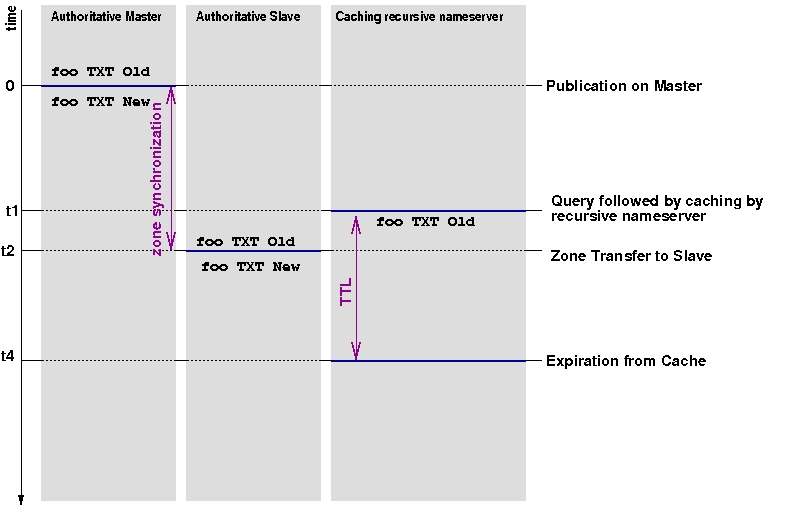
First let us take a closer look at how data traverses through the DNS. See Figure 10 for reference.
At t0 new data replaces data from a previous version of the zone file. The data is published on the authoritative master (or primary server). It will take some time (which we refer to as zone synchronisation time) before the new version of the zone is picked up by all authoritative servers. In the worst case scenario, a change to a slave server will not be able to reach the master server and the zone will expire. So the maximum value of the zone synchronisation time will be the value of the SOA expiration parameter.
Assume that at some time (t1) between publication of the new zone on the master server(t0) and the time the new zone is picked up by a slave server (t2) a query for the data is done by a recursive caching name server. That recursive server will return the old data to any of its clients for the time that is set by the TTL value on the old RRset. Only after t4, will the recursive server go back and query for new data picking up the new records.
Note that the t4 does not only depend on t1+TTL but is also upper bound by the signature expiration time of the signature on the old RRset.
4.2 ”Pre-Publish” and ”Double Signature” rollovers
During a pre-publish rollover the public key is introduced in the DNSKEY RRset well before RRSIGs are made with the private part of the key. The ”new” public keys are then available in caches when the RRSIGs over the data show up on the authoritative name servers and caching name servers can use cached DNSKEY RRs to validate the new data.
During a double signature rollover the new key pair is introduced and signatures are generated with both the new and the old key. Both public keys are published in the DNS. After the period it takes for this data to propagate through the DNS, the old key is removed and only the new key is published and used for signing.
4.3 Tools
To properly maintain ’state’ you will need an operational note book. For each of your zone there will be multiple KSKs and ZSKs and these keys all have a ’state’. The situation may become very confusing. Below we give an overview of the operations using an ”operational note book” At the RIPE NCC we have developed a tool replaces the ”operational note book” and that links to the signing operations. This tool is available through: http://www.ripe.net/disi/dnssec_maint_tool/.
4.4 ZSK rollover
During a Zone-signing key (ZSK) rollover we use a ”pre-publish” scheme.
4.4.1 ZSK preparation (production phase)
Use the trivial example.com zone (Figure 11) as an example. The zone is stored in db.example.com.
Assuming that we first start to publish example.com we generate two ZSK keys and one KSK key.
dnssec-keygen -a RSASHA1 -b 1024 -n ZONE example.com
dnssec-keygen -a RSASHA1 -b 1024 -n ZONE example.com
In the operational note book we note that key 63935 will be used as the active and key 64700 as the passive ZSK. Both keys will be available through the key-set but only the active key is used for signing.
After we generated the keys we include them in the zone by adding the following include statements to db.example.com
Then sign the zone. Since we do not want to use dnssec-signzone’s default behaviour, (which is to use all available keys for signing), we have to fully specify which keys to use on the command line. Since you will have to do this frequently the operational note book will come in handy.
Note that we supplied the KSK as an argument with the -k switch and only the active key ZSK as a signing key.
4.4.2 ZSK rollover (phase1)
Note down the signature expiration of the DNSKEY RR as it is now available in the DNS. This value can be used as an upper limit for the duration of this phase. It is the value of t4 in Figure 10. In the DNSKEY RR set below the signature expiration time is August 21, 2004 around 11:35 UTC. If all 13 the TTLs in your zone are not higher than for example 600, you would not have to wait that long. You would have to wait until you see the new zone published in all authoritative servers and an additional 10 minutes. The signature expiration is an upper bound.
AQPQyhg865V4zkFZN+FICLAZPWWaAf5I43pW
UcuOiejT92AVu0eHOkbH5YiHV97r+QjAdZ7K
W7W+bvbqKBR5P4QMVNm8zCs5Trb9OcOY0+bb
LYZG3aG69wUfF1pjvmFV5zUSRHCLMEzXb5NS
XdazgdhhuM07L2e2EfJGp5qijtRwpQ==
AQPWrMsW0sGSTD7iE9ou+s7886WeSLIq/l/J
CgqwAn7jlECGAAN6cSHV5jWvovcWFthapWdG
DpC1uL48AcWtVWkRABGjU8Q16CAy0EcZ+24V
4cul+VluBt1YjuNfUlye+k5V+lmkjXBQ3Qdf
E8/owjsdx9mTkeQC4qiFjUxWXTl4DQ==
AQPhZQ29Xg60NLgR+qdJENZpklU+WQF0abmp
Ni3CeOYyR+bd01Q/2WDI6BbWCLdIb9YflRaj
hmyb+AmzmjNzhw8VjcY9Sr2zIcG50ctuZ8Og
t7fcGrCbEM9fIDIKdDRlf+SY8OnGEMi6sI4m
bZ4zoh+nWfNrTxQR5hHv074uSAvZyQ==
100 RRSIG DNSKEY 5 2 100 20040821114554 (
20040722114554 54915 example.com.
gcnf3rf+D6izv9A//16u+Jx/LDVinLtcpkWR
yxDV5goS2SnoLfyEryqbSAyKbh4redyQCjSW
/HZXFBoPYrAy8fqaY1AfjVP+q9zJPvysUOp+
2T6mm8/9pcZoGXw1wPjPUAz+AF0oJnoaWo7t
764xvZc47kAI1pT0RTizV2BofcU= )
100 RRSIG DNSKEY 5 2 100 20040821114554 (
20040722114554 63935 example.com.
T7gRcEZkxEl5iGJdCzSu47Og9ydMO5Uggvcz
A9jETiTUrBttyYua7qDZOjNrzT4GVZ6s/UBw
At the moment of the rollover you have to make your current passive key (64700) active and your current active key (63935) passive. Also make a note that this key is to be removed from the keyset in the next phase of the rollover.
Increase the SOA serial number and re-sign the zone using the new active key.
Publish this zone in the DNS and make sure it remains published long enough to propagate through the DNS.
4.4.3 ZSK Cleanup (phase2)
After the data has propagated though the DNS, you have to replace the passive ZSK (63935) by a new passive key.
Start with generating the passive ZSK.
Add the new passive key (01844) into the zone file. Remove the old passive key (63935) from the zone file.
Increase the SOA serial and re-sign using the same active key as in phase1.
After publishing your zone you are back in the ”production” phase. You should not proceed in a new rollover until the current DNSKEY RRset has had a chance to propagate through the system
You can now delete the 63935 key. We suggest you move the key pair to a separate directory or make a backup.
4.4.4 Modifying zone data during a rollover
You can at any time modify zone data other than the data in the key-set. As long as you use the suitable active ZSK for signing.
4.5 Key-signing key rollovers
During a key-signing key (KSK) rollover we use a ”double signature” scheme.
4.5.1 KSK preparation (production phase)
We again use the trivial example.com zone (Figure 11) as an example. The zone is stored in db.example.com. It contains a active and a passive ZSK (63935 and 64700 respectively) and a KSK (54915). The include statements are the same as Section 4.4.1:
and the command to sign the zone is also the same.
4.5.2 ZSK rollover (phase 1)
We start the rollover by generating a new KSK
Insert the new KSK into the zone file:
$include Kexample.com.+005+63935.key
$include Kexample.com.+005+64700.key
Sign the zone with both KSKs and the active ZSK.
You have now introduced the new KSK key.
Since you are rolling a KSK you will have to upload this key to your parent or have to configure it into your trust anchors (see Section 1.3). The public key you will have to upload and configure is the new one with key-id 06456.
If your parent has a DS RR pointing to your old key, it will take time before that DS RR has expired from caches. The upper limit on the t4 parameter is the signature expiration time in the DS RR pointing to the old KSK (54915).
dnssec-signzone provides two files that will help you during this process. dsset-example.com. and keyset-example.com.. The ”dsset” file contains the DS RRs that relate to the KSKs in your zone file and the ”keyset” file contains the KSKs published in your zone file. Remember that since you are replacing keys only one of these entries (06456) will need to be sent/appear at your parent.
4.5.3 KSK cleanup (phase 2)
Once you are satisfied that all trust anchors are updated and the parental DS RR has travelled through the DNS you can remove the old key from the set of includes:
$include Kexample.com.+005+63935.key
$include Kexample.com.+005+64700.key
Sign the zone with the new KSK and the active ZSK.
From this moment on you are in the production phase again.
4.5.4 Multiple KSKs
This algorithm also applies if you have multiple KSKs.The steps are:
- generate and include the new KSK in the zone;
- sign the zone with all KSKs; wait for propagation;
- remove one of the KSKs and sign with all left over KSKs.
Part II
Securing communication between Servers
This part considers transaction security issues. It is focuses on securing the transactions between authoritative servers, but the same techniques can be used to secure dynamic updates.
5 Securing zone transfers
5.1 Introduction
The communication between hosts can be secured (authenticated and encrypted) using a scheme based on symmetric cryptography. By sharing a key the administrators of two servers can be sure that DNS data is only being exchanged between those two boxes and that the data has not been tampered with in transit.
The most known mechanism used to enable this is referred to as TSIG[12] and is based on a shared secret. The shared secret is used to sign the content of each DNS packet. The signature can be used for both authentication and for integrity checking of the data. In order to prevent a malicious third party retransmitting captured data (replay attack) a time stamp is included in the data. The TSIG mechanism can also be used to prevent unauthorised zone transfers; only owners of the secret key are able to do a zone transfer 14. We will describe how primary server ns.foo.example and secondary server ns.example.com need to be configured to enable TSIG for zone transfers.
To configure TSIG perform the following steps:
- Synchronise clocks.
- Create and distribute a shared secret, the TSIG key.
- At the primary server, create an access list specifying which keys are allowed to transfer.
- At the secondary server, specify which keys to use when contacting which primary servers
The first item is a prerequisite for DNSSEC. If you do DNSSEC you should be in sync with the rest of the world: Use NTP. Time zones can be confusing. Use date -u to validate if your machine has the proper UTC time.
TSIG configuration is a task for system administrators.
5.2 Generating a TSIG key
There are various ways to create a shared secret.
5.2.1 Generating a TSIG secret with dnssec-keygen
dnssec-keygen is the tool used to generate a base64 encoded random number that will be used as the secret. The arguments that we have to provide dnssec-keygen to generate a TSIG key are (also see Figure 6):
dnssec-signzone -a hmac-md5 -b 256 -n HOST ns.foo.example.ns.example.com.
The command produces two files 15. The name of the files contain relevant information:
Kdomain_name+algorithm_id+key_id.extension
The domain_name is the name specified as the name of the key. The name specified here does not need to be a name that you can query in the DNS but should be a name can be encoded as a domain name. The convention is to concatenate the DNS names of the two servers.
One can use dnssec-keygen to generate a truly random secret or use a passphrase - we describe both methods in Section 5.2. In this particular case ns.foo.example. and ns.example.com. The algorithm_id identifies the algorithm used: 5 for HMAC-MD5 (1 and 3 are for RSA and DSA respectively, see Appendix A.1. in [5]). The key_id is an identifier for the key material, it is not of relevance for symmetric keys. The extension is either key or private, the first is the public key and the second is the private key.
The format of these files differs a bit but they contain exactly the same information; a base64 encoded random number that you are going to use as a shared secret. Do not be misled by the extensions private and key, both files should be kept secure. Since the secret material is copied to the configuration files and these files are not used in production you should actually consider deleting them.
Note that the -n HOST and the name are not used for the generation of the base64 encoded random number. It is a convention to use the unique domain name label used to identify the key as the name.
# dnssec-keygen -r /dev/random -a HMAC-MD5 -b 128 -n HOST \
ns.foo.example.ns.example.com.
Kns.foo.example.ns.example.com.+157+12274
# cat Kns.foo.example.ns.example.com.+157+12274.key
ns.foo.example.ns.example.com. IN DNSKEY 512 3 157 gQOqMJA/LGHwJa8vtD7u6w==
The base64 encoded random number is is the thing you need to extract from either of these files (i.e. gQOqMJA/LGHwJa8vtD7u6w==) it specifies the secret in the key statement:
This key definition should be included in both primary and secondary name server configuration files and should be exactly the same on both sides (in this example ns.foo.example.ns.example.com. is used on both name servers). It is recommended to generate a secret for each different party, with which you are involved and you will need to maintain as many secrets as zones for which you have secondaries.
5.2.2 Other ways to generate secrets
The dnssec-keygen command provides you with a truly random bit sequence. It might be difficult to communicate the secret to your colleague running a secondary server on the other side of the world. In those cases you may want to choose to fall back to a pass-phrase that can be communicated over the telephone.
You can use any base64 encoder to convert the pass-phrase to a valid string in the key-definition.
If mmencode is not available maybe this perl script can assist you.
Actually any string that can be base64 decoded will do, for example ThisIsAValidBase64String can also be used as secret.
5.3 Configuring TSIG keys
To secure a zone transfer, the primary server and the secondary server administrators have to configure a TSIG key in named.conf. The TSIG key consists of a secret and a hashing algorithm and are identified by domain names. We recommend that you maintain the list of secret keys in a separate file which is readable by root only and included in the named.conf file (e.g. by include /var/named/shared.keys).
The key statement looks like:
This statement needs to be exactly the same for the two parties involved.
5.4 Primary servers configuration of TSIG
Both the primary and secondary server should have shared secret configured by using the key statement in a file included in named.conf (see above).
The primary server can now use the key in what BIND calls an
[3] address_match_list. These lists appear in the allow-notify, allow-query,
allow-transfer and allow-recursion statements which controls access to the
server. (Also see section 6.1.1 and 6.2.14.3 of the on-line BIND documentation).
Relevant at this point is the allow-transfer in the zone statement. Using the key generated above, the primary server for foo.example would have the following statement in named.conf:
\\ allow transfer only from secondary server that has
\\ key ns.foo.example.ns.example.com.
5.5 Secondary servers configuration of TSIG
Both the primary and secondary server should have shared secret configured by using the key statement in named.conf (see above).
The server definition in named.conf is used to instruct the name server to use a specific key when contacting another name server.
5.6 Securing the NOTIFY message too
The setup above will provide signatures for the zone transfer from the primary to the secondary. Since the session is initiated by the secondary server 16 it is the secondary server that sets up the secure link. Therefore, the secondary server has the server definition in its named.conf. Alternatively you can secure the traffic to the secondary server that was initiated by the primary server. Think of the NOTIFY messages send to the secondary server when the zone content changed. That traffic will be TSIG signed as soon as you add a server with the secondary’s IP address in the primary’s named.conf. You can use the same key as for the zone transfer.
Once the primary server has configured its server to use TSIG to sign the NOTIFY messages the secondary server can use the key in the allow-notify access control list.
5.7 Troubleshooting TSIG configuration
You can check the format of your named.conf using the named-checkconf program. This program reads the configuration file using the same routines as named itself.
To troubleshoot your configuration, you have the log file and dig at your disposal.
Before adding the allow-transfer {key ns.foo.example.ns.example.com. ;}; you should be able to transfer the domain from any machine. dig @ns.foo.example foo.example AXFR should be successful. After key configuration the same command should fail and give you output similar to:
You can test if the key is configured correctly in two ways.
Method 1 Ask the zone administrator to increase the SOA serial and to have the zone reloaded on the primary server. The secondary server should pick up the changes. The log file of the secondary server will have entries similar to:
... general: info: zone foo.example/IN: transfered serial 2001082801
... xfer-in: info: transfer of ’foo.example/IN’ from 10.1.1.2\#53: end of transfer
Method 2 Use dig to test the key by using the -k flag.
Alternatively you can use the -y switch and specify the key-name and the secret 17 with the -y switch.
If the key did not match the log file of the primary server against which you tried this, will have entries similar to the following.
5.8 Possible problems
5.8.1 Timing problems
Machines that are involved in a TSIG signed transaction need to have their clocks synchronised to within a few 18 minutes. Use ’NTP’ to synchronise the machines and make sure the time zones are correctly configured. A wrong time-zone configuration can lead to hard to spot problems; use date -u to check what your machine thinks is the ’UTC’ time.
5.8.2 Multiple server directives
TSIG is a mechanism to protect communication on a per machine basis. Having multiple server directives for the same server or multiple keys in one server directive will lead to unexpected results.
Part III
Troubleshooting tools
This part describes a few practical trouble shooting tools that may help to understand what goes wrong, if something goes wrong.
6 Using drill for troubleshooting
Both dig, from the BIND distribution, as drill can be used for trouble shooting DNSSEC set ups. See section 7 for more information about dig, we will first discuss drill.
|
bin/drill version 1.2.0 (ldns version 1.3.0 ) Copyright (c) 2004-2006 NLnet Labs. Licensed under the revised BSD license. There is NO warranty; not even for MERCHANTABILITY or FITNESS Usage: bin/drill name [@server] [type] [class] <name> can be a domain name or an IP address (-x lookups) arguments may be placed in random order -T trace from the root down to <name> -S chase signature(s) from <name> to a know key [*] -f file read packet from file and send it -i file read packet from file and print it -w file write answer packet to file -q file write query packet to file -a only query the first nameserver (default is to try all) -b <bufsize> use <bufsize> as the buffer size (defaults to 512 b) -c <file> use file for rescursive nameserver configuration (/etc/resolv.conf) -k <file> specify a file that contains a trusted DNSSEC key [**] used to verify any signatures in the current answer -o <mnemonic> set flags to: [QR|qr][AA|aa][TC|tc][RD|rd][CD|cd][RA|ra][AD|ad] lowercase: unset bit, uppercase: set bit -p <port> use <port> as remote port number -s show the DS RR for each key in a packet -u send the query with udp (the default) -r <file> use file as root servers hint file -t send the query with tcp (connected) -d <domain> use domain as the start point for the trace -y <name:key[:algo]> specify named base64 tsig key, and optional an algorithm (defaults to hmac-md5.sig-alg.reg.int) -z don’t randomize the nameservers before use
|
drill is part of the ldns library available from http://www.nlnetlabs.nl/ldns/. Installation instructions are also available on that page. (It is as simple as: ./configure ; make ; make install).
Drill’s -T and -S switches are particularly helpful when troubleshooting DNSSEC setups. Using drill with the -T follows the chain of trust from the root to the leaves and indicates the security status (see figure 13). With the -S flag drill will chase the signatures from the leave-node back to the root, looking for the relevant records (see figure 14). When using the -T or -S flag you will have to specify a file that contains a trust-anchor in RR format i.e. just as in the files generated by dnssec-keygen (see page 37).
|
1[T] . 100 IN DNSKEY 256 3 5 ;{id = 63380 (zsk), size = 1024b} . 100 IN DNSKEY 257 3 5 ;{id = 63276 (ksk), size = 1280b} [T] net. 100 IN DS 13467 5 2 ec9b094786b82c46aa3054c7352b59904b697119d515b4ea536ec3dd9a10ed81 net. 100 IN DS 13467 5 1 de01426e08ddb9186502ccc1081390cd7da0e178 1[T] net. 100 IN DNSKEY 257 3 5 ;{id = 13467 (ksk), size = 1280b} net. 100 IN DNSKEY 256 3 5 ;{id = 62972 (zsk), size = 1024b} 1[T] example.net. 100 IN DS 49656 5 2 9e06b299abe811d699e077fff990ff5a1b496c914deb22697ba22a1da31f0a6e example.net. 100 IN DS 49656 5 1 3850efb913aec66275bca53221587d445702397e 1[T] example.net. 100 IN DNSKEY 257 3 5 ;{id = 49656 (ksk), size = 1280b} example.net. 100 IN DNSKEY 256 3 5 ;{id = 17000 (zsk), size = 1024b} 1[T] example.net. 100 IN SOA ns.example.net. olaf.nlnetlabs.nl. 2002050501 100 200 604800 100 ;;[S] self sig OK; [B] bogus; [T] trusted
|
|
;; ->>HEADER<<- opcode: QUERY, rcode: NOERROR, id: 29747 ;; flags: qr rd cd ra ; QUERY: 1, ANSWER: 2, AUTHORITY: 2, ADDITIONAL: 0 example.net. 100 IN SOA ns.example.net. olaf.nlnetlabs.nl. 2002050501 100 200 604800 100 example.net. 100 IN RRSIG SOA 5 2 100 20070921083639 20070822083639 17000 example.net. Mu1v2Ec/0DNqzznqJSC3TCEo2QP49avYYSWJvHQB9qzc9h5u5/p5mNttYlcMpAKr6GErhoUpafWUWASfEXLYj0nGyVukyy0qb3iJVpzxRrLm5QwsBLV/qkimsePRivaAmfKi0FDctX0dO4oAKxHF3huSuMFYzMcbuCm8/gXPVJA= ;{id = 17000} example.net. 100 IN NS ns.example.net. example.net. 100 IN RRSIG NS 5 2 100 20070921083639 20070822083639 17000 example.net. DAnDQABdHJV8oGpf4vQWszDMpmM6FfoULU9SJ8FRp1AHEj6jRRRqLD/l8g6GE19ivCOG1ru6yAjL33FWphH8c8Nnuby5GqvZmfumP4/I+ZWuTIrbpoAd7DuaoC3rLSLQ1QAHmHR0X85o6vvMmGPlxPBJ8r8xGcZt6jlaJvK1+jU= ;{id = 17000} ;; EDNS: version 0; flags: do ; udp: 4096 ;; WHEN: Wed Aug 22 11:36:41 2007 |---example.net. (DNSKEY keytag: 17000) |---example.net. (DNSKEY keytag: 49656) |---example.net. (DS keytag: 49656) |---net. (DNSKEY keytag: 62972)
|
The ldns library does not only come with drill. You will find a few useful utilities in its examples directory. Among others there are:
- ldns-key2ds
- Creates a DS record from a DNSKEY record
- ldns-keyfecther
- Fetches DNSSEC public keys for zones
- ldns-keygen
- Generate private/pubkey key pair for DNSSEC.
- ldns-signzone
- Signs a zone file according to DNSSECbis.
- ldns-walk
- ’Walks’ a DNSSEC zone
7 Using dig for troubleshooting
dig has a few switches that come in useful when troubleshooting DNSSEC setups.
- +multiline
- Structures the output of dig so that it is easily readable. As a bonus the keyid will be printed as a comment behind DNSKEY RRs.
- +cd
- Sets the ”checking disabled” bit on the query. You would typically use this when your validating recursive name server reports a SERVFAIL and you need to establish if the is due to DNSSEC marking this data as ”bad”.
- +dnssec
- Forces the server being queried to include the DNSSEC related data. Use in combination with the +cd to establish if data from a zone is signed at all or if you want to determine if the validity intervals on the signatures are correct.
- +trace
- Traces delegation chain. This option may be helpful if you trying to figure out where the delegation points are.
- +sigchase
- Traces the the signature chain. You will also need to have a ./trusted-keys.keys or /etc/trusted-keys.keys available that contains trusted key entries.
8 DNSSEC tools
A number of open-source DNSSEC tools can be found at www.dnssec-tools.org. The site contains a number of generic maintenance tools for zone and key administration, some DNSSEC applications (mozilla and spam assasin plug-ins), and a few troubleshooting tools.
One of these tools has is dnspktflow tool that visualizes DNS ’streams’ in a graph. This tool may help, in combination with the tools above, to create a bit of insight of what is going on. For instance, in figure 15 the packets that are send and received during the trace in figure 14 are shown.
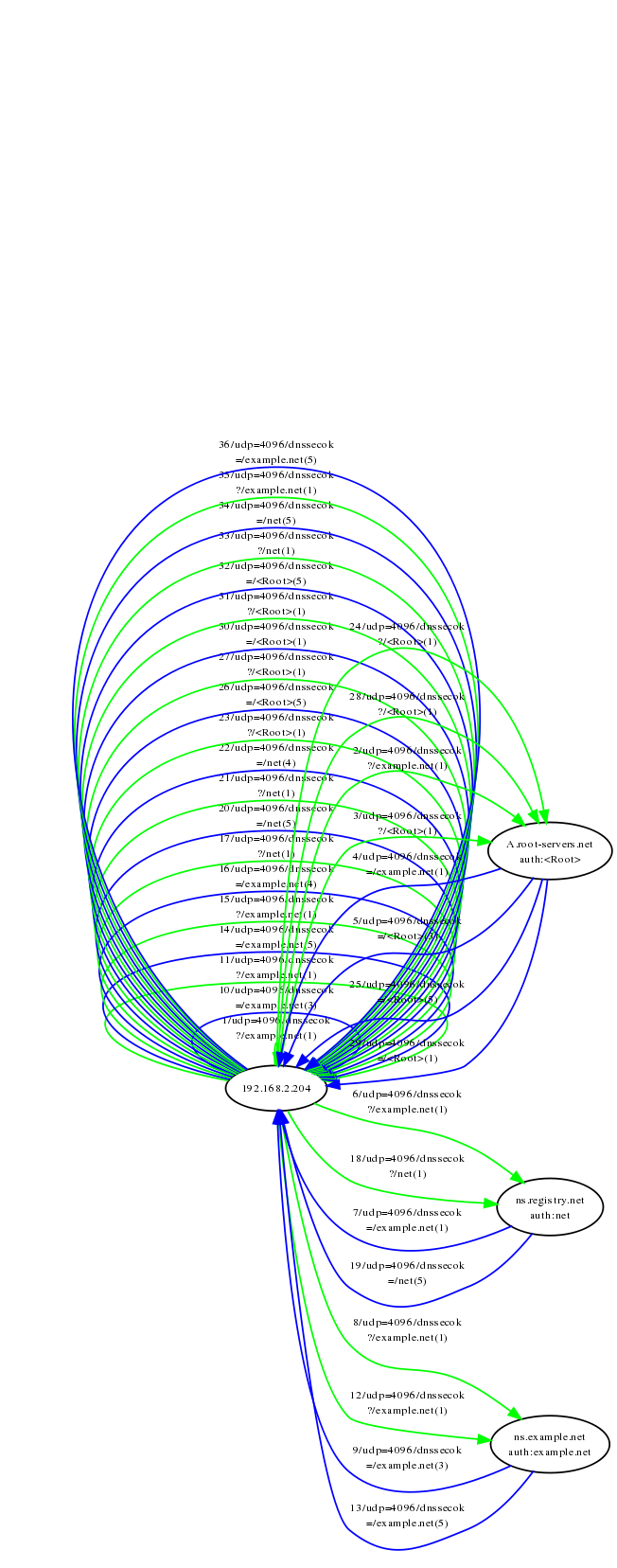
Part IV
Appendices
A BIND installation
There are two open-source reference implementations of DNSSEC for authoritative servers known to the author: BIND and NSD (http://www.nlnetlabs.nl/nsd). BIND is currently the only open-source recursive name server known to do DNSSEC validation.
DNSSEC is available as of BIND 9.3.0. The latest versions of BIND can be found on ISC’s ftp server. DNSSEC support is only compiled if the openssl library is configured during compilation.
Make sure you fetch the latest version of BIND (take care of the patch level of the release indicated by -Pnumber) and verify the checksum.
configure with the --with-openssl flag.
If you want to have the ”sigchase” capability (see Section 7) compiled into dig you will have to set the STF_CDEFINES variable to the -DDIG_SIGCHASE=1
Check the output of config to confirm that openssl was found. For example:
openssl sha1 bind-9.4.1-P1.tar.gz
./configure --prefix=/usr/local --with-openssl=/sw/
Checking whether byte ordering is bigendian... yes
checking for OpenSSL library... using openssl from /sw//lib and /sw//include
Please note that BIND 9.4.1 does not have DNSSEC enabled by default. Therefore you have to use the dnssec-enable and the dnssec-validation directives in the options section of named.conf.
B Estimating zone size increase
When planning to sign zones you have have to consider that zone-signing will increase your zone file size and the amount of memory used in the authoritative name servers. We have performed some measurements where we took a number of zone files, signed them and loaded them on a name server.
We started with the 1.8 thousand zones that the RIPE NCC serves on their authoritative servers. For a number of these zones the RIPE NCC is the primary server but for the largest part these are zones for which the RIPE NCC is secondary. The zones can roughly be split into two classes; ”end-node” zones and ”delegation” zones. In end-node-zones, the data for most names in the zone is authoritative (containing e.g. A, AAAA or PTR for most names). Delegation zones contain mostly delegations (NS) records, typically these are Top-Level Domains and ”/16 reverse delegation” domains.
We signed the zone files with a 1024 bit RSASHA1 zone-signing key. During the signing NSEC RRs with corresponding RRSIGs are added and all RRsets in the zone are signed. Since a delegation NS RR is not an authoritative piece of data, no signature is created.
Typically for an ”end-node” zone one NSEC and two RRSIGs are introduced into the zone, while for a delegation-type zone only one of each type of security record is introduced. In Figure 16 we plotted the zone file size increase as a function of the number of NSEC records. The number of NSEC records correlates with the number of domain names in a zone. In the figure you can clearly see a bi-modal distribution. One for the ”end-node” type of zones and one for the delegation type of zone.
We fitted two linear relations to this data and found that for a delegation type of zone the size increase is 350 bytes per owner name while for an ”end-node” zone the increase is 672 bytes per owner name.
In Figure 17, we plotted the relation between increase in core size versus the zone file size increase due to signing. The relation is linear and the slope is roughly 0.73. The core size increase is roughly 200 and 500 bytes for delegation type and end-node type zones respectively.
You can use these parameters for approximate size calculations. Results may vary depending on the size and the algorithm of the key you use, the version of BIND 19 and the content of the zone.
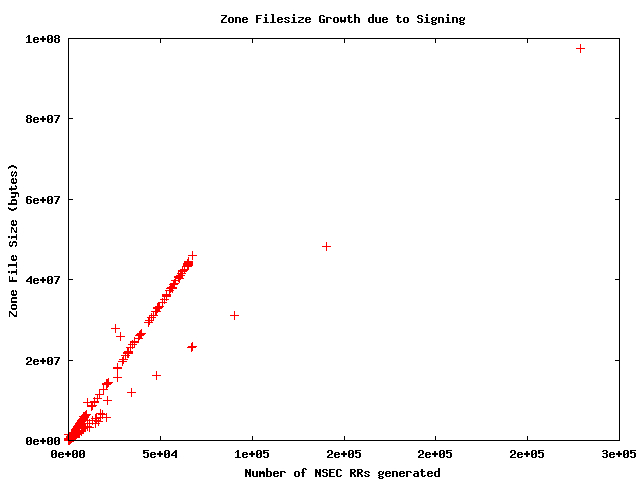
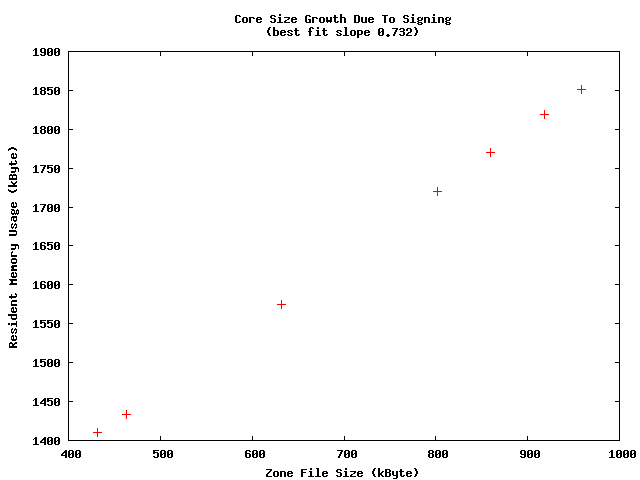
C Generating random numbers
The generation of keys and, for the DSA algorithm, the generation of signatures requires random numbers. You should take care that the random number generator produces ”genuine” random numbers. The quality of random numbers generated in software is debatable. This also applies to /dev/random devices. These extract ”randomness” from hardware response times. You should ensure that your operating system produces a flow of good random numbers. For a machine that does not have any external sources of ”randomness”, this may be tricky to achieve and cause your key generator or signer to block and wait for entropy (”randomness”).
One relatively simple tool to test ”randomness” of data streams is ent from Fourmilab <http://www.fourmilab.ch/random/>. Alternatively you could use tools from NIST <http://csrc.nist.gov/rng/>. ”Good” measurement result from ent or the NIST tools should not be taken as a proof that your random number generator is perfect. There could be systematic effects that are hard to find using this particular tool 20.
Relatively cheap sources of random data are USB crypto tokens. For more information about these tokens and random number generation see the Openfortress website <http://openfortress.org/cryptodoc/random/>.
D Perl’s Net::DNS::SEC library
If you want to build tools to maintain your DNSSEC zones you may want to have a look at the Net::DNS::SEC library available on (CPAN <http://search.cpan.org/dist/Net-DNS-SEC/>). Using this extention to the Net::DNS library it is fairly easy to write scripts such as the one below that validate that the signature over a SOA will not expire within the next 24 hours.
#!/usr/local/bin/perl -T -Wall
# Example script that queries an authoritative server for a SOA
# record and verifies that the signatures over the record are still
# valid and will not expire in the next 24 hours.
# This anotated and somewhat verbose script is written for
# demonstration purposes only hence some possible error conditions
# The domain and its master server.
my $authoritative_server="ns.secret-wg.org";
# Setting up the resolver (use perldoc Net::DNS::Resolver for the
# documentation of this class and its methods)
my $res = Net::DNS::Resolver->new();
# Query the default resolver to find out what the address is of the
my $answerpacket_auth_server= $res->query($authoritative_server,"A");
# Digest the packet see perldoc Net::DNS::Packet and perldoc
# Net::DNS::RR::A We ignore error checking. The first RR in the answer
# section is assumed to be the A RR for ns.secret-wg.org.
my $auth_address=($answerpacket_auth_server->answer)[0]->address;
# Set up the resolver object so it queries the authoritative server.
$res->nameserver( $auth_address );
# Set up the resolver so that it talks DNSSEC
# Send the query for the soa to the authoritative nameserver.
my $packet=$res->send($domain,"SOA");
# Digest the answer section, realizing there may be more than one
# RRSIG (per definition there is always one SOA RR.
foreach my $rr ( $packet->answer ){
die "NO SOA RR found" unless $soa;
die "NO RRSIGs over the SOA found" unless @soasig;
print @soasig ." signatures found\n";
# Fetch the keys that belong to this zone (DNSKEYs live, like the SOA
$packet=$res->send($domain,"DNSKEY");
foreach my $rr ( $packet->answer ){
die "NO DNSKEYS found for $domain" unless @keyrr;
# Now loop over each signature, fetch the public part of the key with
# which the signature was made, validate the signature and do the date
# See perldoc Net::DNS::RR::RRSIG for the methods to access the RRSIGs
SIGLOOP: foreach my $sig ( @soasig ){
print "Checking signature made with key ".$sig->keytag ."\n";
# first select the key with the proper keytag from the key set.
KEYLOOP: foreach my $key (@keyrr){
next KEYLOOP if ($key->keytag != $sig->keytag);
print "WARNING: NO public key found to validate:\n " .
$sig->string."\n" unless $keyfound;
if (! $sig->verify([ $soa ],$keyfound)){
# The signature did not validate. Say why.
print "WARN: Signature made with " .$sig->keytag . " failed to verify:\n".
# Lets verify if we have more than 24 hours before expiration.
$sig->sigexpiration =~ /(\d{4})(\d{2})(\d{2})(\d{2})(\d{2})(\d{2})/;
my $expiration=timegm ($6, $5, $4, $3, $2-1, $1-1900);
my $hourstogo=($expiration-time())/3600;
print "WARNING: Signature made with ".$sig->tag. "will expire within ".
References
[1] Ron Aitchison. Pro DNS and BIND. Apress, 2005.
[2] Paul Albitz and Cricket Liu. DNS and BIND, 4th Edition. O’Reilly, 4 edition, April 2001.
[3] R. Arends, R. Austein, M. Larson, D. Massey, and S. Rose. DNS Security Introduction and Requirements. RFC 4033 (Proposed Standard), March 2005. http://www.ietf.org/rfc/rfc4033.txt.
[4] R. Arends, R. Austein, M. Larson, D. Massey, and S. Rose. Protocol Modifications for the DNS Security Extensions. RFC 4035 (Proposed Standard), March 2005. http://www.ietf.org/rfc/rfc4035.txt, (Updated by RFC 4470).
[5] R. Arends, R. Austein, M. Larson, D. Massey, and S. Rose. Resource Records for the DNS Security Extensions. RFC 4034 (Proposed Standard), March 2005. http://www.ietf.org/rfc/rfc4034.txt, (Updated by RFC 4470).
[6] Geoff Huston. DNSSEC The Opinion. The ISOC ISP column, November 2006. http://ispcolumn.isoc.org/2006-10/dnssec3.html.
[7] Geoff Huston. DNSSEC The Practice. The ISOC ISP column, September 2006. http://ispcolumn.isoc.org/2006-09/dnssec2.html.
[8] Geoff Huston. DNSSEC The Theory. The ISOC ISP column, August 2006. http://ispcolumn.isoc.org/2006-08/dnssec.html.
[9] O. Kolkman and R. Gieben. DNSSEC Operational Practices. RFC 4641 (Proposed Standard), September 2006. http://www.ietf.org/rfc/rfc4641.txt.
[10] O. Kolkman, J. Schlyter, and E. Lewis. Domain Name System KEY (DNSKEY) Resource Record (RR) Secure Entry Point (SEP) Flag. RFC 3757 (Proposed Standard), April 2004. http://www.ietf.org/rfc/rfc3757.txt, (Obsoleted by RFCs 4033, 4034, 4035).
[11] Evi Nemeth. Securing the DNS. ;login:, pages 21–31, November 2000.
[12] P. Vixie, O. Gudmundsson, D. Eastlake 3rd, and B. Wellington. Secret Key Transaction Authentication for DNS (TSIG). RFC 2845 (Proposed Standard), May 2000. http://www.ietf.org/rfc/rfc2845.txt, (Updated by RFC 3645).
[13] Paul Vixie. Preventing Child Neglect in DNSSECbis Using Lookaside Validation (DLV). IEICE-Transactions on Communications, E88-B, number 4:21–31, April 2005.
[14] Paul Vixy and Mark Andrews. DNSSEC Lookaside Validation (DLV), April 2006. http://www.isc.org/pubs/tn/isc-tn-2006-1.html.
Acknowledgements
The RIPE NCC for their initial investment of my resources in this document.
There are numerous people who helped compiling these notes, either by helping me to understand DNSSEC or by giving feedback on earlier versions of this document. Special thanks go to Roy Arends, Adrian Bedford, Emma Bretherick, Daniel Diaz, Miek Gieben, Geoff Huston, Daniel Karrenberg, Marc Lampo, Ed Lewis, Cricket Liu, Rick van Rein, Andrew Ruthven, Jakob Shlyter, Paul Vixie, and Wouter Wijngaards who provided feedback on this or earlier versions of this document Also, thanks to the participants of a DNSSEC workshop at InERLab in November 2006 for being guinea-pigs for version 1.8. A workshop organized bu USC/ISI on operational testing of DS in Washington DC has provided a substantial amount of material for version 1.3 of the document. Finally, a ’login;’ article by Evi Nemith[11], the text in the BIND book and the various presentations by Edward Lewis have been the examples on which I based version 1.1 of this document.
Colophon
This document will be subject to change. Please regularly check for new versions. <http://www.nlnetlabs.nl/dnssec_howto/>. Your corrections and additions are appreciated.
If you have questions, remarks or contributions please contact dnssec-howto-editor at nlnetlabs dot nl
The sourcetext of this document has shortly been in Docbook format. As of version 1.8 it is again authored as tex. I have much more experience and control over the output with TeX. As of version 1.8 some of the examples and log-outputs are maintained with some shell scripts and make.
The source text and the “DNS infrastructure” needed to create example output is all under subversion version control.
This PDF version of the howto has been created with pdf2latex the html version has been created with tex4ht. The tex source, or a snapshot of the subversion repository, is available on request (dnssec-howto-editor at nlnetlabs dot nl).
Document History
- Version 1.8
- Public release, January 2006
The document was brought under subversion control. That changed the revision numbering from doted notation to continous revision numbers. The publication versions are now manually remained. The document source has been back-ported from docbook to latex. Section 3 was rewritten and names and addresses where made consistent. Most of the examples are now generated automatically in order to maintain consistency after software upgrades.
Some minor editorial corrections were performed post publication. The subversion Id is relevant.
- Revision 1.7
- Public release, April 2005.
Paragraph added to clarify the TSIG signing of NOTIFY messages. Minor editorial fixes. References were added.
- Revisions 1.6
- Public release, December 2004
Minor editorial fixes.
- Revisions 1.5
- Public release.
- Revisions 1.4.4.1 - 1.4.4.9
- Several snapshots that where not publically available. The document source was ported from TeX to docbook source and was updated to reflect experiences with keymanagement. Large chunks were rewritten and we added a number of figures. This version of the documentation is based on the DNSSEC bis specification and bind9.3.0beta implementation.
- Version 1.3, Oct 2002
- The first modification of the document. First experiences with DS have been incooperated and the document has been rewritten to be useful as a more generic HOWTO and introduction to \dnssec operations.
- Version 1.2
- was not published.
- Version 1.1
- Was compiled for a DNSSEC tutorial in Prague, October 8, 2000. The document was a set of notes to be used in a workshop setup.
COPYRIGHT
Copyright © 2006, 2007 NLnet Labs
Copyright © 2002, 2003, 2004, 2005 RIPE NCC
Legal Notice
This document and the information contained herein is provided on an as is basis and NLnet Labs and RIPE NCC disclaim all warranties, express or implied, including but not limited to any warranty that the use of the information herein will not infringe any rights or any implied warranties of merchantability or fitness for a particular purpose.
This document and translations of it may be copied and furnished to others, and derivative works that comment on or otherwise explain it or assist in its implementation may be prepared, copied, published and distributed, in whole or in part, without restriction of any kind, provided that the above copyright notice and this paragraph are included on all such copies and derivative works.